Files on a USB drive can often be recovered, provided the drive has not been written to since the loss and the fault is logical (deleted files, a damaged file system, a lost partition) rather than physical. The correct first action is the same in every case: stop using the drive, do not format it, and do not run repair utilities on it. This guide sets out what happens to files when they disappear, a careful Windows procedure for ordinary personal use, and the point at which a matter should be handed to a forensic examiner, particularly where the contents may later be relied upon in a dispute, an employment matter or a criminal or civil case.
Key takeaways
- Deleted files are often still on the drive until new data overwrites them, so the single most useful step is to stop writing to the USB device immediately.
- Microsoft’s free Windows File Recovery tool can attempt recovery, but it needs a separate destination drive and the correct mode for the file system.
- Formatting, running repair tools or copying recovered files back onto the source can destroy the very data you are trying to retrieve.
- If the files may become evidence, ordinary recovery is the wrong route: the original should be preserved, imaged and hashed before anything is examined.
Table of Contents
- What happens to files on a USB drive when they disappear
- What to do in the first five minutes
- Recovering deleted files on Windows
- Other approaches, and their limits
- When the files may be evidence
- Recovery is not the same as secure deletion
- Our perspective
- Support from Computer Forensics Lab
- Frequently asked questions
- Sources
What happens to files on a USB drive when they disappear
A USB flash drive stores files and a record of where those files sit. When a file is deleted, the usual effect is that the directory or allocation reference is removed and the space is marked as available for reuse, rather than the content being erased at once. NIST’s introductory forensics material describes this behaviour, and it explains why recovery is possible while the relevant content remains intact and why it becomes less likely once new data overwrites the same areas.
A drive that appears empty is not necessarily one whose files were deleted. The same symptom can arise from several different conditions, and each calls for a different method:
- Deleted files: the references have been removed but the content may remain.
- Hidden files: the files exist but are not displayed under the current view settings.
- A damaged file system: Windows reports that the drive needs formatting, or shows it as RAW.
- A lost partition: the drive reports the wrong capacity or no usable volume.
- A changed drive letter: the drive is present but is not appearing where expected.
- Physical failure: the drive is not detected at all, or connects and disconnects repeatedly.
Identifying which of these applies matters because a forced format or an automated repair can turn a recoverable situation into an unrecoverable one. A format is not a reliable way to make anything permanently disappear either, which is a separate problem we return to below.
What to do in the first five minutes
The actions taken immediately after a loss often determine the result more than any software chosen later.
- Remove the drive safely and stop using it. Every write, including an automatically created thumbnail or index file, risks overwriting deleted data.
- Do not format the drive when Windows offers to, and do not accept prompts to scan and fix it.
- Check the simple explanations first. Look in the Recycle Bin of the computer (files deleted from a USB drive are typically not sent there, but files that were moved from the computer may be), confirm that hidden items are shown, and try a different USB port or computer.
- Look for another copy. Cloud storage, email attachments, a previous backup or File History may already hold the file.
- Decide whether the contents could matter legally. If there is any prospect of a dispute, disciplinary process or investigation, stop here and read the section on evidential material below.
If the drive is not detected, makes no connection, or has been physically damaged, software will not help and repeated attempts can worsen the condition. NIST’s teaching material notes that a device may fail during repeated use, which is a good reason to limit the number of attempts you make.
Recovering deleted files on Windows
Microsoft publishes a free, command-line recovery application for this purpose. According to Microsoft Support, Windows File Recovery can attempt to recover deleted files from USB devices when they are not in the Recycle Bin, though it does not support cloud storage or network shares. Microsoft’s store listing describes it as a tool for computers, USB drives and memory cards, and its documentation indicates support for Windows 10 version 2004 and later and for Windows 11, across the NTFS, FAT, exFAT and ReFS file systems. Recovery from solid-state drives is subject to limitations.
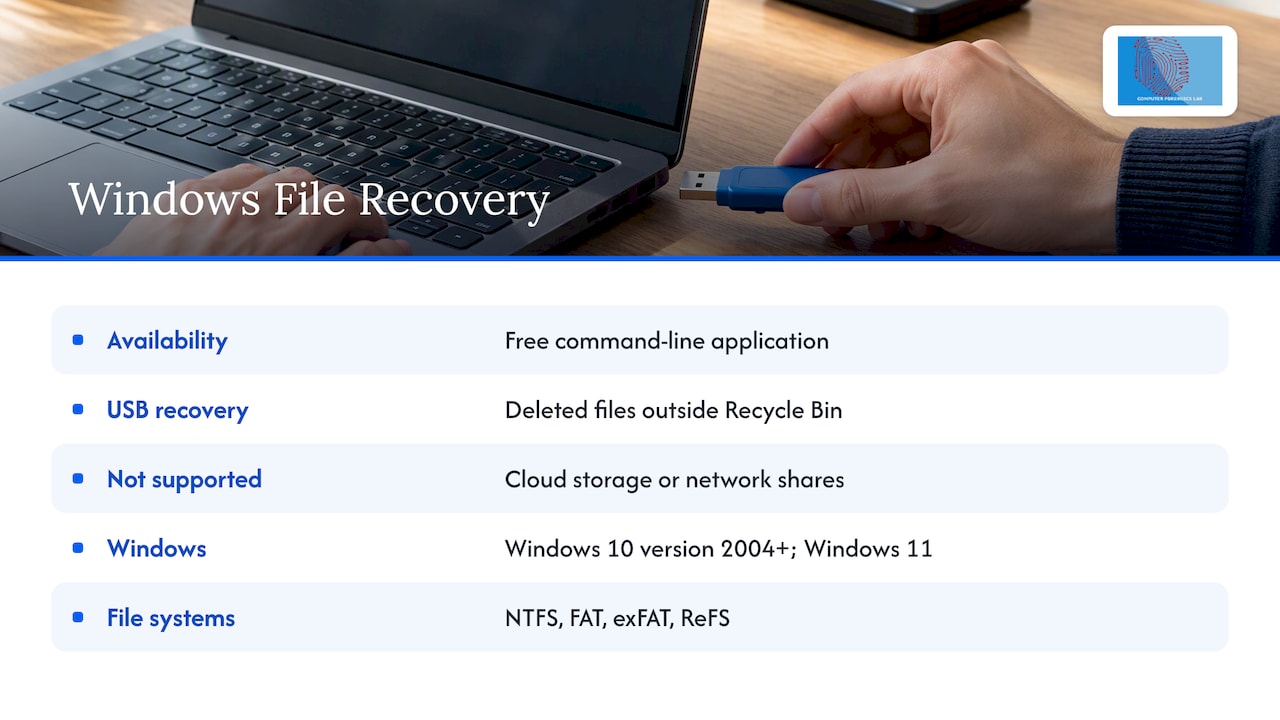
The tool has no graphical file browser, so the commands should be copied carefully and the drive letters checked before anything is run.
Step by step
- Install Windows File Recovery from the Microsoft Store.
- Connect the USB drive and note its letter in File Explorer, for example E:.
- Choose a different destination drive with enough free space, such as C: or a second external drive. The source and destination must not be the same, and nothing should be saved to the USB drive.
- Open Command Prompt as administrator.
- Run a command in the form
winfr source: destination: /mode /n filter. - Review the recovery folder the tool creates on the destination. Microsoft states that it names this folder Recovery followed by the date and time.
An example from Microsoft’s documentation is winfr E: C: /extensive /n *invoice*, which searches drive E: for files with “invoice” in the name and places any results on drive C:. File-extension filters such as *.pdf and *.docx work in the same way, and the tool can handle common document, image, video, audio and archive formats.
Choosing the right mode
Microsoft ties the choice of mode to the file system and the scenario, which is why a one-click scan is a weak substitute for identifying the problem first. According to Microsoft’s guidance, the usual position is as follows.
| File system | Common on | Situation | Mode Microsoft recommends |
|---|---|---|---|
| NTFS | Larger flash or USB drives | Recently deleted files | Regular |
| NTFS | Larger flash or USB drives | Files deleted some time ago, formatted or corrupted disk | Extensive |
| FAT or exFAT | Flash or USB drives under 4 GB, and many others | Any of the above | Extensive |
To check the file system, right-click the drive in File Explorer, choose Properties and read the File system line. If Windows reports the drive as RAW, the file system itself is damaged, and the careful course is to stop and consider imaging the drive rather than repeatedly scanning it.
What recovery will and will not give you
Recovered files may be incomplete or unusable if parts of their storage have been reused. Where a tool recovers content by its signature rather than from the directory record, the result may lack the original name, path and timestamps. That is acceptable for a lost holiday photograph. It is a considerable weakness where the question is who created a document, when it was last changed, or where it was stored.
Other approaches, and their limits
The search results for this topic are dominated by consumer recovery applications, and many of them work adequately for simple deletions. Some general points apply to any of them:
- Install the software on the computer, never on the affected USB drive.
- Save recovered files to a different drive from the one being scanned.
- Prefer tools that read the drive without writing to it, and be cautious about any that offer to repair the drive as part of the scan.
- Treat a free scan that shows a long list of files as a preview, not a guarantee. Names may be visible while the content has already been overwritten.
- Free partition-repair utilities can restore a lost partition table, but they alter the drive. They suit a drive holding nothing of evidential value.
NIST’s Computer Forensics Tool Testing programme publishes specifications and test material for deleted-file recovery, which is a useful reminder that tools differ in how accurately they recover data and that documented validation exists for those used professionally. A consumer application that opens a file has shown that the file opens, not that the file is a faithful copy of what was deleted.
When the files may be evidence
The advice above is written for ordinary personal and small-business use. It changes once the contents of the drive may be relied on in a legal, regulatory, employment or criminal matter. Examples include a departing employee suspected of copying company data, a disputed document in a family or commercial case, a drive handed over in a police inquiry, or a device produced during a disciplinary hearing.
Why ordinary recovery can undermine the evidence
Plugging a drive into a normal computer can change metadata, timestamps and other file system state. The professional question is therefore not which recovery application to use but how the original can be preserved. NIST describes the defensible sequence as creating an exact copy of the drive without altering the original, then working from that copy.
In practice, an evidential workflow does the following:
- documents the exhibit, including make, model, serial number and condition;
- preserves the original and records every handling step, so that continuity is demonstrable;
- acquires a complete image using a write blocker where practicable, so that nothing is written to the source;
- calculates a cryptographic hash of the acquired data, so that the copy can be verified independently;
- examines the working copy, not the original;
- reports the methods used, the limitations, and any failed attempts.
Dragging and dropping files from the drive to a laptop is not forensic acquisition, and in England and Wales that distinction can matter. GOV.UK’s statutory code of practice for forensic science activities lists the capture, processing and analysis of data from digital storage devices among the activities it covers. The Forensic Science Regulator’s guidance on method validation explains that methods should be validated and subject to quality assurance, with checks by an expert for anything beyond simple tool operation. Reliability is shown by validated methods, competent personnel and transparent reporting, not merely by producing a file that opens.
Evidential handling is not unique to England. Practitioners in other jurisdictions publish comparable procedures, for example this guide to preserving digital evidence from a Moldovan law practice, though the legal powers and admissibility rules it describes belong to that country and not to England and Wales.
Authority and lawful access
Where a public body is involved, authority matters as well as technique. The UK’s Electronic Devices Code of Practice indicates that removable USB storage can fall within the broad definition of an electronic device, and that authorised extraction in England must be carried out by appropriately trained personnel in accordance with the applicable standards. The legal power, consent requirement, disclosure duty and admissibility position all depend on the case and the jurisdiction, so solicitors, local authorities and corporate investigators should obtain authority and preserve provenance before any examination, and take case-specific legal advice.
What a forensic examiner can find that a consumer tool cannot
Forensic recovery can reach well beyond the visible directory. NIST’s data leakage case materials, which include USB removable storage devices formatted with exFAT, illustrate how examiners look at metadata-based recovery, signature-based carving, unused areas of the disk and removable media. A drive that looks empty may still hold deleted records, fragments, earlier file system structures, or traces of copying activity. Where the question is not only “what was on this drive” but “what was done with it”, our guide to USB activity as forensic evidence explains what the surrounding computer can reveal.
For the legal footing of recovered material, see can deleted files be proven in UK courts and how to recover deleted data for legal investigations.
Recovery is not the same as secure deletion
The same properties that make recovery possible make deletion unreliable. A flash drive uses spare cells and wear levelling, so ordinary overwriting may not address every physical location. NIST’s guidelines on media sanitisation discuss why flash media may retain data in places not directly reachable through the normal interface. Two practical conclusions follow:
- Do not assume that a formatted drive, or an empty folder, proves that data is gone. This matters to anyone passing on or disposing of a drive that held client, personnel or financial records.
- Where a drive held sensitive material and must be disposed of, follow a documented sanitisation process rather than a quick format.
Our perspective
In our experience, the most common mistake with a USB drive is not choosing the wrong software but acting too soon and too often. Each attempt at self-repair adds writes, changes metadata and, on a failing device, uses up reliability that cannot be restored. We would sooner see a drive left untouched for a day while the right course is decided than see three scans, a format and a copy back onto the same drive.
Our work is built around independent, impartial examination and a defensible chain of custody, with reports intended to be understood and challenged by a court. For a family photograph, the Windows procedure above is a sensible attempt. For any drive whose contents may be disputed, the same drive should be handed over unopened, with a note of who has handled it and when. We can then image it, verify the acquisition, examine the copy and report the limitations as plainly as the findings. More on how we approach this is set out in data recovery for evidence that stands up and the imaging and cloning stage of recovery.
— Computer
Support from Computer Forensics Lab
If a USB drive holds material that may be needed for litigation, an internal investigation or a criminal matter, or if the drive has failed physically, we can help. Our London-based team provides forensic data recovery, digital evidence acquisition and expert witness reporting for solicitors, businesses, public bodies and private clients, including emergency and advanced recovery. Instructions and enquiries can be sent through our main site, and we recommend contacting us before the drive is plugged in again.
Frequently asked questions
Can files on a USB drive be recovered?
Often, yes. Deletion usually removes the reference to a file rather than the content, so recovery is possible until the space is reused. The longer the drive stays in use after the loss, the lower the chance of a complete recovery.
Where do files go when deleted from a USB drive?
Files deleted from a USB drive generally bypass the Recycle Bin. Their directory entries are removed and the space is marked as available, but the content may remain until new data overwrites it. This is why the drive should not be used after a deletion.
My USB files have disappeared. How can I recover them?
First check whether the files are hidden, whether the drive letter has changed and whether another copy exists in backup or cloud storage. If not, use Windows File Recovery with a separate destination drive, selecting the mode to suit the file system. If the drive is damaged or not detected, stop and seek specialist help.
Should I format a corrupted USB drive to get it working again?
Not if you want the files. Formatting rewrites the file system structures and can make recovery harder or impossible. Recover first, ideally from an image of the drive, and format only once everything needed has been saved elsewhere.
Is recovering files myself acceptable if they may be used in court?
It is not advisable. Opening the drive normally can alter metadata, and files copied across without an image, hash and handling record are harder to defend. Preserve the drive as it is and have it acquired by a qualified forensic examiner.
Sources
- Windows File Recovery, Microsoft Support
- Windows File Recovery, Microsoft Support (mode guidance)
- Windows File Recovery, Microsoft Store
- Digital Forensics (introduction), NIST
- Deleted File Recovery, NIST CFTT
- Forensic science activities statutory code of practice, GOV.UK
- Method validation in digital forensics, GOV.UK
- Electronic Devices Code of Practice, GOV.UK
- CFReDS Data Leakage Case, NIST
- Guidelines for Media Sanitization, NIST SP 800-88