
Microsoft Purview eDiscovery is the unified electronic discovery toolset built into Microsoft 365, designed to help legal and compliance teams identify, preserve, collect, review, and export electronically stored information (ESI) for investigations, regulatory enquiries, and litigation. Microsoft describes it as an in-place solution meaning data stays within the Microsoft 365 environment until you are ready to export, which materially reduces spoliation risk. Three distinct tools sit under the Purview umbrella: Content Search for ad-hoc queries, eDiscovery (Standard) for structured case management with holds and audit trails, and eDiscovery (Premium) for full end-to-end legal workflows including advanced analytics, attorney-client privilege flagging, and custodian management.
For most UK legal teams handling civil litigation, regulatory disclosure, or internal investigations, eDiscovery (Standard) is the minimum defensible option. Premium is warranted when the matter is complex, the data volumes are large, or expert witness admissibility is a concern.
Note: Microsoft retired the classic eDiscovery experiences on 31 August 2025. All guidance here targets the current Microsoft Purview experience.
Key takeaways
Microsoft Purview eDiscovery provides UK legal teams with a defensible, in-place workflow for identifying, preserving, collecting, reviewing, and exporting electronically stored information across Microsoft 365, but its defensibility depends entirely on correct configuration, timely holds, and active processing checks.
| Point | Details |
|---|---|
| Choose the right tier | Content Search suits ad-hoc queries; Standard is the minimum for defensible legal holds; Premium is required for complex matters with large data volumes. |
| Holds must be placed promptly | Preservation duties arise when litigation is reasonably anticipated; delayed holds create exploitable gaps in disclosure. |
| Check processing reports | Partially indexed items can cause responsive documents to be missed; trigger reindexing before finalising any collection. |
| Review sets are static | Items in a review set do not reflect post-collection changes; re-collect if later modifications become relevant to the matter. |
| Know when to escalate | Deleted data, suspected tampering, criminal proceedings, or data outside Microsoft 365 require a specialist forensic provider with chain-of-custody documentation. |
Table of Contents
- What is Microsoft eDiscovery and where does it sit in Microsoft 365?
- Which data sources does Purview eDiscovery cover?
- How does the Purview eDiscovery workflow operate end to end?
- How do Content Search, eDiscovery Standard, and eDiscovery Premium compare?
- What admin prerequisites does your tenant need before you start?
- Common pitfalls and UK-specific defensibility considerations
- How can you integrate Purview eDiscovery with other tools and automate workflows?
- What are the licensing and billing requirements for UK tenants?
- When should a UK legal team involve a digital forensics provider?
- Practical first steps for UK legal and compliance teams
- A practitioner’s perspective on where Purview eDiscovery actually fails UK teams
- Sources
What is Microsoft eDiscovery and where does it sit in Microsoft 365?
Microsoft Purview eDiscovery lives inside the Microsoft Purview compliance portal, which is the unified risk and compliance layer of Microsoft 365. It is not a standalone product; it draws on the same data governance infrastructure as Microsoft Purview Information Protection, Audit, and Retention, which means case actions generate entries in the tenant’s audit log automatically.
The practical benefits for legal and compliance teams are substantial:
- In-place data management. Content is preserved and collected without being moved prematurely, which protects chain of custody and reduces the risk of inadvertent alteration.
- Centralised case management. Each matter gets its own case container with scoped permissions, search history, holds, review sets, and export records.
- Defensible audit trails. Every significant action, including hold creation, search execution, and export, is logged at case level and in the tenant-wide audit log.
- Review sets and analytics. Items collected into a review set are stored as a static copy in secure Azure Storage, allowing tagging, redaction, near-duplicate detection, and email threading without touching live data.
For UK teams, the compliance portal’s audit capabilities align with the Information Commissioner’s Office (ICO) expectation that organisations can demonstrate what data was accessed, by whom, and when. Cross-tenant scenarios, such as investigating a third-party supplier’s Microsoft 365 environment, require separate agreements and are outside the scope of native Purview tools; that is a scenario where a specialist digital forensics service becomes necessary.
Which data sources does Purview eDiscovery cover?
Purview eDiscovery can search and collect content across various Microsoft 365 services including Exchange Online mailboxes, Microsoft Teams messages, SharePoint Online sites, OneDrive for Business accounts, Microsoft 365 Groups, Viva Engage, and supported M365 app data sources.
Cloud attachments, the links shared in Teams messages or Outlook emails that point to files stored in SharePoint or OneDrive, require careful handling. Microsoft’s features guide confirms that eDiscovery can collect the linked files, but investigators must verify that the actual target file has been preserved and collected, not merely the message containing the link. A link is not evidence; the document it resolves to is.
For hybrid environments or data held outside Microsoft 365, Purview supports PST uploads and third-party data connectors (for platforms such as Bloomberg, Slack, and others via Microsoft’s connector catalogue). Limitations apply: on-premises Exchange servers, local file shares, and non-Microsoft cloud storage are not natively searchable and require separate acquisition workflows.
How does the Purview eDiscovery workflow operate end to end?
Microsoft Learn’s step-by-step guidance structures the Purview workflow across five stages. Each stage has specific actions and defensibility considerations.
- Identify. Define the custodians (individuals whose data is relevant), the data sources, and the date ranges. In eDiscovery (Premium), custodians are formally added to the case with documented acknowledgement, creating a clear record of scope.
- Preserve. Place legal holds on custodian mailboxes, OneDrive accounts, SharePoint sites, and Teams data. Holds prevent deletion and modification of in-scope content. Always confirm hold status in the case dashboard and retain the hold confirmation report as a defensibility artefact.
- Collect. Run scoped searches against the preserved sources. In Premium, collections are drafted first, allowing you to review estimated results before committing to a review set. This two-stage collection model reduces unnecessary data ingestion and associated storage costs.
- Review. Add collected items to a review set, which is a static copy stored in secure Azure Storage. Items in the review set do not reflect subsequent changes in the live environment, which is precisely what makes them defensible. Use analytics features (near-duplicate grouping, email threading, attorney-client privilege detection) to reduce review volume before human review begins.
- Export. Export the review set with its associated metadata, load files, and manifest. The export manifest documents what was exported, from which review set, and when, providing the provenance record a court or regulator will expect.
Pro Tip: Before exporting, verify that cloud attachments in your review set resolve to the actual stored file rather than a placeholder link. Cross-reference the export manifest against your hold confirmation to confirm that every preserved custodian’s data is represented. This two-point check is one of the most reliable ways to demonstrate chain of custody in a UK disclosure exercise.
How do Content Search, eDiscovery Standard, and eDiscovery Premium compare?
The three tools serve different operational needs, and choosing the wrong one for a legal matter is a common and costly error.
| Feature / dimension | Content Search | eDiscovery (Standard) | eDiscovery (Premium) |
|---|---|---|---|
| Capabilities | Ad-hoc keyword and filter searches across M365 sources | Case management, holds, search, review sets, export | Full workflow: custodian management, advanced collections, analytics, privilege detection, review sets |
| Defensibility / audit trail | Limited; no case-level audit, no holds | Case-level audit log, hold reports, export manifests | Full case audit, custodian acknowledgement records, processing reports |
| Analytics and review support | None | Basic review set tagging | Near-duplicate detection, email threading, attorney-client flagging, predictive coding |
| Licensing required | Microsoft 365 E3 or equivalent | Microsoft 365 E3 minimum | Microsoft 365 E5 or E3 plus Compliance add-on |
| Best for | IT admin queries, non-legal data location tasks | Standard litigation holds, regulatory enquiries, internal investigations | Complex litigation, large data volumes, matters requiring expert witness support |
Content Search is adequate for locating data quickly, but industry guidance is clear that it does not provide the case management, hold infrastructure, or audit trails required for court-grade defensibility. If the matter could end in disclosure obligations, a tribunal, or regulatory scrutiny, Standard is the minimum appropriate tool.
eDiscovery (Premium) adds custodian management, advanced indexing, and predictive coding. For matters involving tens of thousands of documents or where privilege review is a significant workload, Premium’s analytics can reduce review time substantially.
Licensing is covered in detail below, but the key point is that Premium features require either an E5 licence or a separately purchased Microsoft Purview Compliance add-on per user.
What admin prerequisites does your tenant need before you start?
Getting the tenant configuration right before a live matter begins is not optional. Errors discovered mid-case, such as a missing role assignment or a blocked enterprise app, can delay preservation and create defensibility gaps.
- Assign role groups. Navigate to the Microsoft Purview compliance portal and assign users to the appropriate eDiscovery role groups: eDiscovery Manager (for case creation and management) and eDiscovery Administrator (for cross-case oversight). Role assignments are logged in the audit trail.
- Enable the MicrosoftPurviewEDiscovery enterprise app. Microsoft Learn’s admin guidance lists the specific enterprise applications that must be enabled in Azure Active Directory for Purview eDiscovery to function. The MicrosoftPurviewEDiscovery app is the primary one; verify it is not blocked by a conditional access policy.
- Check conditional access policies. Conditional access rules that restrict app sign-in by location, device compliance, or multi-factor authentication can silently block eDiscovery operations. Test sign-in for the eDiscovery service account before a live matter and document the result.
- Verify Microsoft Graph API permissions. If your team plans to automate workflows or export via script, confirm that the required Graph API permissions are consented at the tenant level. Attempting to run automated collections without pre-consented permissions will fail without a clear error message.
- Run a test case. Before any live matter, create a test case, place a hold on a non-sensitive mailbox, run a search, and export a small sample. This confirms the full workflow is operational and gives your team a documented baseline.
- Document the configuration state. Screenshot role assignments, enterprise app status, and conditional access exceptions. This documentation supports your defensibility record if the configuration is later questioned.
Common pitfalls and UK-specific defensibility considerations
Several assumptions that legal teams commonly make about Purview eDiscovery are incorrect, and each one carries real risk in a UK legal context.
- Content Search is not a defensible workflow on its own. Without holds, case-level audit logs, and review set provenance, Content Search results cannot reliably demonstrate that data was preserved in its original state from a specific point in time.
- Partial indexing is a genuine evidence risk. Microsoft’s documentation explicitly warns that partially indexed items and processing failures can cause responsive items to be missed. Triggering reindexing and reviewing processing reports before finalising a collection is a necessary step, not an optional one.
- Cloud attachments are not automatically collected. A Teams message containing a link to a SharePoint document does not automatically bring that document into scope. Investigators must verify the target file is preserved and collected separately.
- Review sets are static at the point of collection. Items added to a review set do not update if the source data changes. If a custodian modifies a document after collection, the review set reflects the pre-modification version. This is correct behaviour for defensibility, but investigators must re-collect if post-collection changes become relevant.
- Hold confirmation is not automatic. A hold placed on a mailbox can fail silently if the mailbox is in an error state. Always verify hold status in the case dashboard and retain the confirmation report.
For UK practitioners, the disclosure obligations in civil litigation under the Civil Procedure Rules require that parties preserve potentially relevant documents from the moment litigation is reasonably anticipated. Purview’s hold functionality directly supports this duty, but only if holds are placed promptly and their scope is documented. Under UK GDPR and the Data Protection Act 2018, preservation and review of personal data for litigation purposes must be proportionate; review set access should be restricted to those with a legitimate need, and data should not be retained beyond the matter’s conclusion without a lawful basis.
Defensibility checklist:
- Audit logs enabled and retained for the duration of the matter
- Hold confirmation reports saved for each custodian and data source
- Export manifests retained with the case file
- Review set provenance documented (which collection, which search, which date)
- Processing reports checked for indexing failures before review begins
How can you integrate Purview eDiscovery with other tools and automate workflows?
Purview eDiscovery is not a closed system. Several integration points allow legal teams to extend its capabilities or connect it to specialist review platforms.
- Microsoft Graph API provides programmatic access to eDiscovery case management, including creating cases, adding custodians, placing holds, and triggering collections. The eDiscovery Ninja community resources include Graph API examples and automation scripts that are particularly useful for repeatable processes such as employee departure investigations.
- Azure Storage export. Review set exports can be directed to an Azure Blob Storage container, enabling downstream processing by third-party review platforms such as Relativity or Nuix. This is the standard integration path for large matters where specialist review tooling is required.
- Third-party data connectors. Microsoft’s connector catalogue allows ingestion of non-Microsoft data (Bloomberg, Slack, ICE Chat, and others) directly into Exchange Online, making it searchable via Purview. Each connector has its own licensing and configuration requirements.
- Automated workflows via Power Automate. For routine compliance tasks, Power Automate can trigger hold creation or case notifications based on HR system events, though this requires careful testing to avoid unintended scope.
When exporting to a third-party platform, validate that original timestamps, metadata fields, and file hashes are preserved in the export manifest. Mapping discrepancies between Purview’s metadata schema and a third-party review platform’s field structure are a common source of processing errors that can delay review and, in the worst case, result in metadata loss.
What are the licensing and billing requirements for UK tenants?
Licensing for Purview eDiscovery is per-user and tied to the Microsoft 365 subscription tier. The requirements are as follows:
- Content Search: available with Microsoft 365 E3, Microsoft 365 Business Premium, and equivalent plans.
- eDiscovery (Standard): requires Microsoft 365 E3 or an equivalent plan that includes the Compliance workload. Verify that the compliance features are included in your specific SKU, as some E3 variants sold through resellers exclude them.
- eDiscovery (Premium): requires Microsoft 365 E5 or Microsoft 365 E3 plus the Microsoft Purview Compliance add-on. The add-on must be licensed for every user whose data is placed in scope, not just the investigators running the case.
Beyond per-user licensing, storage and processing charges can apply depending on the volume of data committed to review sets and the complexity of processing (for example, decryption and OCR of large document sets). Before running a large collection, review the tenant’s billing dashboard and check the eDiscovery process reports to estimate storage consumption. Unexpected storage charges on large matters are a common budget surprise for teams that have not reviewed the billing model in advance.
Pro Tip: Run a draft collection in eDiscovery (Premium) before committing data to a review set. The draft collection report shows estimated item counts and data volumes, allowing you to refine search scope and avoid ingesting irrelevant data that will inflate storage costs and review time.
When should a UK legal team involve a digital forensics provider?
Purview eDiscovery handles a wide range of standard litigation and compliance scenarios well. There are, however, specific circumstances where the tool’s native capabilities are insufficient and a specialist digital forensics provider should be engaged.
Involve a forensic provider when:
- Data has been deleted or is encrypted beyond Purview’s native decryption capabilities. Purview can decrypt some encrypted content, but it cannot recover data that has been permanently deleted from the recycle bin and purge queue, or data protected by third-party encryption tools.
- Tampering or spoliation is suspected. If there is reason to believe data has been deliberately altered or destroyed, a forensically sound acquisition by an independent expert is necessary to establish what existed and when.
- Chain-of-custody documentation must withstand cross-examination. Purview’s audit logs are strong, but they document system actions rather than physical evidence handling. An expert witness report from a qualified forensic practitioner provides the independent, court-admissible account of evidence acquisition that a judge or opposing counsel may require.
- Data sources are outside Microsoft 365. Mobile devices, local workstations, external drives, and non-Microsoft cloud services require specialist acquisition tools and methodologies that are outside Purview’s scope.
- The matter involves criminal proceedings. Law enforcement liaison, PACE compliance, and the evidential standards required in criminal courts go well beyond what an internal eDiscovery workflow can provide.
Questions to ask a prospective forensic provider:
- What is your evidence handling protocol and how do you document chain of custody?
- Are your practitioners accredited, and does the firm hold relevant ISO certifications?
- Do you have experience providing expert witness testimony in UK courts?
- What is your typical turnaround for a matter of this scope and data volume?
- Can you work alongside our internal Purview workflow, or will you need independent access?
Pro Tip: Before a forensic provider begins acquisition, instruct your IT team to pause any automated deletion or retention policies that might affect in-scope data. Document the time and nature of that instruction. This pre-preservation step, combined with a forensic provider’s chain-of-custody record, creates the evidential continuity that courts expect. Computerforensicslab’s digital forensic investigation team can advise on pre-preservation steps and provide court-ready expert witness reports.
Practical first steps for UK legal and compliance teams
The following checklist gives a realistic starting sequence with indicative timelines and responsible parties.
- Confirm licences (Day 1, IT/Legal). Verify that investigators and custodians hold the correct Microsoft 365 licences for the required eDiscovery tier. Check with your Microsoft reseller or the Microsoft 365 admin centre.
- Assign role groups (Day 1, IT Admin). Add investigators to the eDiscovery Manager role group and designate an eDiscovery Administrator for cross-case oversight in the Purview compliance portal.
- Verify enterprise apps and conditional access (Day 1–2, IT Admin). Confirm the MicrosoftPurviewEDiscovery app is enabled and not blocked by conditional access policies. Test sign-in for the service account.
- Run a test case (Day 2–3, IT/Legal). Create a non-live test case, place a hold on a test mailbox, run a search, and export a small sample. Document the results.
- Create the live case and place holds (Day 3–5, Legal/IT). Open the case, add custodians, and place holds on all in-scope data sources. Save hold confirmation reports immediately.
- Run a draft collection and review estimates (Day 5–7, Legal). In Premium, run a draft collection to review estimated volumes before committing to a review set. Refine search scope as needed.
- Commit to a review set and check processing reports (Day 7–10, Legal). Add the collection to a review set. Review processing reports for indexing failures and trigger reindexing where necessary.
- Export with manifest (as required, Legal). Export the review set with full metadata and retain the export manifest with the case file.
Keep screenshots of role assignments, hold confirmations, processing reports, and export manifests. These documents form the defensibility record for the matter and should be retained for the duration of any litigation or regulatory enquiry.
A practitioner’s perspective on where Purview eDiscovery actually fails UK teams
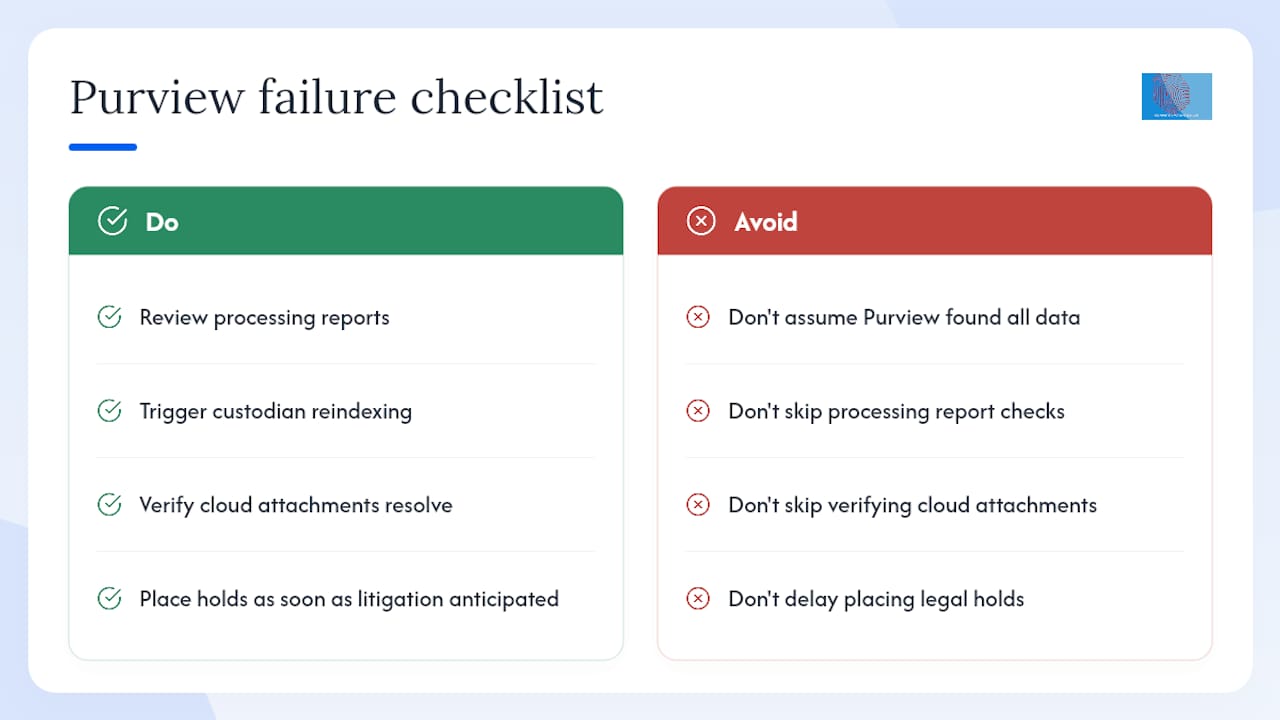
The most consistent problem seen in UK eDiscovery matters is not a technology failure; it is an assumption failure. Legal teams assume that because data lives in Microsoft 365, Purview has found all of it. That assumption is wrong often enough to be dangerous.
Partial indexing is the most underestimated risk. Certain file types, encrypted attachments, and oversized items are not fully indexed by default, and Purview will not alert you to this unless you actively check the processing reports. A review set that appears complete may be missing a material document simply because it was never indexed. The fix is straightforward: trigger reindexing for custodians before finalising a collection, and review the processing report before signing off on completeness.
The second consistent problem is cloud attachment handling. Legal teams frequently assume that collecting a Teams conversation captures all the documents discussed in it. It does not. The message is collected; the linked file may not be, depending on how the collection was scoped. Verifying that cloud attachments resolve to their target files is a step that takes minutes but is routinely skipped.
The third issue is timing. Holds placed after a preservation duty has arisen, even by a day, can create a gap that opposing counsel will exploit. The moment litigation is reasonably anticipated, holds should be placed. Purview makes this technically straightforward; the failure is almost always organisational, not technical.
For matters where any of these risks materialise, or where the data trail extends beyond Microsoft 365, the appropriate response is to involve a specialist. Computerforensicslab provides eDiscovery support and digital forensic investigation for UK legal teams, including chain-of-custody documentation, expert witness reports, and acquisition of data sources outside the Microsoft 365 environment.
Sources
The following primary sources and practitioner resources are the most reliable references for UK legal and compliance teams working with Purview eDiscovery:
Monitor the Microsoft 365 roadmap for planned feature changes, particularly around the retirement of any remaining classic experiences and the rollout of new analytics capabilities in Premium. Feature parity between the classic and new Purview experiences was completed with the August 2025 retirement, but the roadmap continues to evolve.
Where Computer Forensics Lab fits into your eDiscovery process
Our electronic discovery specialists provide end-to-end support for the identification, preservation, collection, processing, searching, review and organisation of electronically stored information (ESI). We work with data held across a wide range of digital sources, including computers, laptops, hard drives, mobile devices, removable media, email systems, cloud platforms, cloud endpoints and other local, remote or hosted electronic storage environments. This can include data from services and endpoints such as Microsoft 365, Exchange Online, OneDrive, SharePoint, Teams, Google Workspace, cloud storage repositories, virtual machines, remote user accounts and other enterprise cloud environments. Our services are designed to assist solicitors, barristers, litigation teams, investigators, corporate legal departments and law enforcement agencies in locating relevant evidence, managing large volumes of electronic data and preparing defensible datasets for legal proceedings, investigations and regulatory matters.. More about our e-discovery services.