Here, a “computer forensics toolkit” means a professional forensic service, not a bundle of software you install yourself. It refers to the accredited process of acquiring, analysing and reporting digital evidence in a form that stands up in court. Law firms, corporate legal departments, law enforcement bodies and private clients instruct such a service when they need forensically sound data recovery, expert analysis, and reporting suitable for litigation, disclosure or internal investigation. The deliverable is court-ready evidence and, where needed, a testifying expert witness.
TL;DR:
- Accreditation to ISO/IEC 17025 and compliance with the Forensic Science Regulator’s code are essential for ensuring the reliability and admissibility of digital evidence.
- Forensic imaging must use validated hardware like write-blockers, with hash verification to confirm evidence integrity before analysis.
- Chain-of-custody records must be detailed and maintained throughout the process, with gaps or unverified seals constituting red flags.
- Turnaround times vary widely depending on data volume, encryption, device types, and urgency, with multi-device investigations generally requiring longer periods.
- Providing clear scope, device details, legal authority, and deadlines at instruction helps optimize case handling, with costs driven by data complexity and expert involvement.
Table of Contents
- The forensic workflow and core services you can commission
- Why accreditation, validation and a QMS matter: key standards to check
- Chain of custody, evidence handling and disclosure obligations
- How to instruct a digital forensics lab: briefing checklist, scope decisions, timescales and cost drivers
- What a court-ready report and expert witness service looks like
- Overview of essential hardware and software tools included in a computer forensics toolkit
- Detailed description of forensic imaging tools and techniques
- Tools for memory and volatile data acquisition
- Analysis tools for file system and artefact examination
- Mobile device forensic tools and considerations
- Provider perspective: how Computer Forensics Lab approaches an instruction
- Instructing Computer Forensics Lab: what to prepare and how it works
- Sources
- FAQ
The forensic workflow and core services you can commission
A properly run digital investigation moves through five stages: assessment, acquisition, examination, analysis and reporting. Assessment establishes scope and legal authority before a single device is touched. Acquisition is where forensic imaging happens, typically using a validated write-blocker to create a bit-for-bit copy of the source media without altering the original. Examination extracts the relevant artefacts from that image, analysis interprets what those artefacts mean in the context of the allegations, and reporting sets the findings out in a form a court or opposing counsel can scrutinise.
Commissioning parties should expect to choose from a defined menu of services rather than a single generic package. Typical engagements include:
- Device imaging and data recovery from computers, external drives and damaged media
- Mobile phone extraction covering call logs, messaging apps and deleted content
- Malware analysis to determine how a system was compromised and what data left it
- Network forensics tracing intrusion paths and data exfiltration
Examiners work from a master copy that is sealed and archived, running all subsequent analysis on a working copy. This protects the original evidence from any risk of alteration and lets a second examiner verify the findings independently. Where devices must remain operational (a live server, for instance, or a phone that would lock on power loss) a triage or live collection approach is used instead of full imaging, and the lab should document why that departure from standard practice was necessary.
Why accreditation, validation and a QMS matter: key standards to check
Not every provider labelled “forensic” operates to the same standard, and the gap matters more than most instructing solicitors realise. The Forensic Science Regulator’s statutory code of practice requires forensic units in England and Wales to operate within an effective quality management system and, for many digital forensic activities, to hold accreditation to BS EN ISO/IEC 17025. That accreditation demonstrates the lab’s methods have been independently assessed for technical competence, not just that it follows an internal checklist.
Method validation and peer review underpin evidential reliability: a technique used to recover deleted data or interpret system artefacts should have been tested and documented before it is relied upon in a live case, and findings should be checked by a second qualified examiner before they leave the lab.
Before instructing, it’s worth requesting:
- Written confirmation of ISO/IEC 17025 accreditation scope
- A declaration of compliance with the Forensic Science Regulator Code
- Evidence of peer review on the specific report being relied upon
Statistic callout: A systemic quality failure in an unaccredited process can force a review of every case that method touched, which is precisely the risk an ISO 17025 quality management system is designed to catch early.
Chain of custody, evidence handling and disclosure obligations
Every exhibit needs a contemporaneous record showing who held it, when it moved, and what was done to it. A defensible chain-of-custody log records:
- The date, time and location of each transfer or examination step
- The names and signatures of everyone who handled the item
- Hash values (typically SHA256) calculated at acquisition and re-verified before analysis
- The condition of packaging or seals at each handover
Originals are normally preserved untouched once imaged, with all analysis performed on a verified working copy. CPS guidance requires unused material to be indexed and kept available for revelation to the prosecutor, and a forensic provider’s index needs to stay current as new material is identified. Gaps in the log, unexplained hash mismatches, or missing seal records are red flags that typically require written remediation before a report can be relied upon.
Pro Tip: Ask any prospective provider to show you a redacted chain-of-custody log from a previous case before you instruct them. If they can’t produce one, that tells you something about how seriously the lab treats documentation.
How to instruct a digital forensics lab: briefing checklist, scope decisions, timescales and cost drivers
A tight instruction speeds everything downstream. Give the lab:
- A short case summary and the specific allegations or issues in dispute
- The devices involved, with make, model and current location
- The legal authority for acquisition (consent, court order, statutory power)
- Any hard deadlines, particularly court dates
Scope is a genuine judgment call. Case law such as R v Bater-James confirms there is no automatic requirement to fully download or inspect a device; a request for broad search parameters needs a proper foundation. A targeted, parameter-based search (specific date ranges, contacts, keywords) is often proportionate and faster; a full device examination is reserved for cases where the targeted approach can’t be justified as sufficient.
Turnaround depends heavily on encryption, the volume of data and whether triage is needed to prioritise urgent material ahead of a full examination. Straightforward single-device imaging can be quick; multi-device corporate investigations with encrypted volumes take considerably longer. Cost drivers typically include specialist data recovery from damaged media, the scale of forensic imaging required, expert witness attendance at hearings, and any request for urgent or out-of-hours turnaround.
What a court-ready report and expert witness service looks like
A report that will survive cross-examination sets out scope, methodology, findings, evidence exhibits, verification hashes, and its own limitations, alongside a chain-of-custody index. SWGDE best practice treats method documentation and stated limitations as inseparable from the findings themselves. Reproducibility matters: another qualified examiner should be able to follow the documented steps and reach the same result.
There’s an important distinction between raw and evaluative reporting. Raw reporting simply lists what was found. Evaluative reporting weighs findings against competing propositions, which is generally what courts want when the question isn’t just “what’s on the device” but “what does this mean.”
- A declaration of compliance with the FSR Code and the lab’s QMS
- Confirmation the report has been peer reviewed before disclosure
Pro Tip: At disclosure and in pre-trial meetings, ask the expert to walk you through how they would defend each finding under cross-examination. If they can’t explain a step simply, a jury won’t follow it either.
Overview of essential hardware and software tools included in a computer forensics toolkit
A forensic lab’s physical and digital toolkit falls into distinct categories, each doing a specific job in the chain from seizure to courtroom. On the hardware side, write-blockers sit between the examiner and the original media, forensic duplicators create verified images at speed, and Faraday bags isolate mobile devices from network signals the moment they’re seized, preventing remote wipe commands from reaching them.
Software falls into acquisition tools (which create the forensic image), examination platforms (which parse file systems and extract artefacts), and analysis suites (which reconstruct timelines, recover deleted content and flag anomalies). Hash verification software runs throughout the process, confirming at every stage that the copy being examined matches the original bit for bit. Mobile extraction platforms handle the different job of pulling data from phones and tablets, where file systems and encryption schemes vary considerably between manufacturers.
None of this equipment is useful in isolation. What makes a toolkit forensically sound is the combination of validated tools, a documented procedure for using them, and an examiner qualified to interpret the output correctly. A prepared equipment kit for a typical instruction includes redundant storage for images, multiple write-blocker interfaces to cover different drive connections, and evidence bags and labels for physical continuity. Legal teams commissioning work don’t need to know every tool by name, but they should expect a lab to be able to name and justify its choices when asked, particularly where a novel or less common tool has been used on a case likely to be contested.
Detailed description of forensic imaging tools and techniques
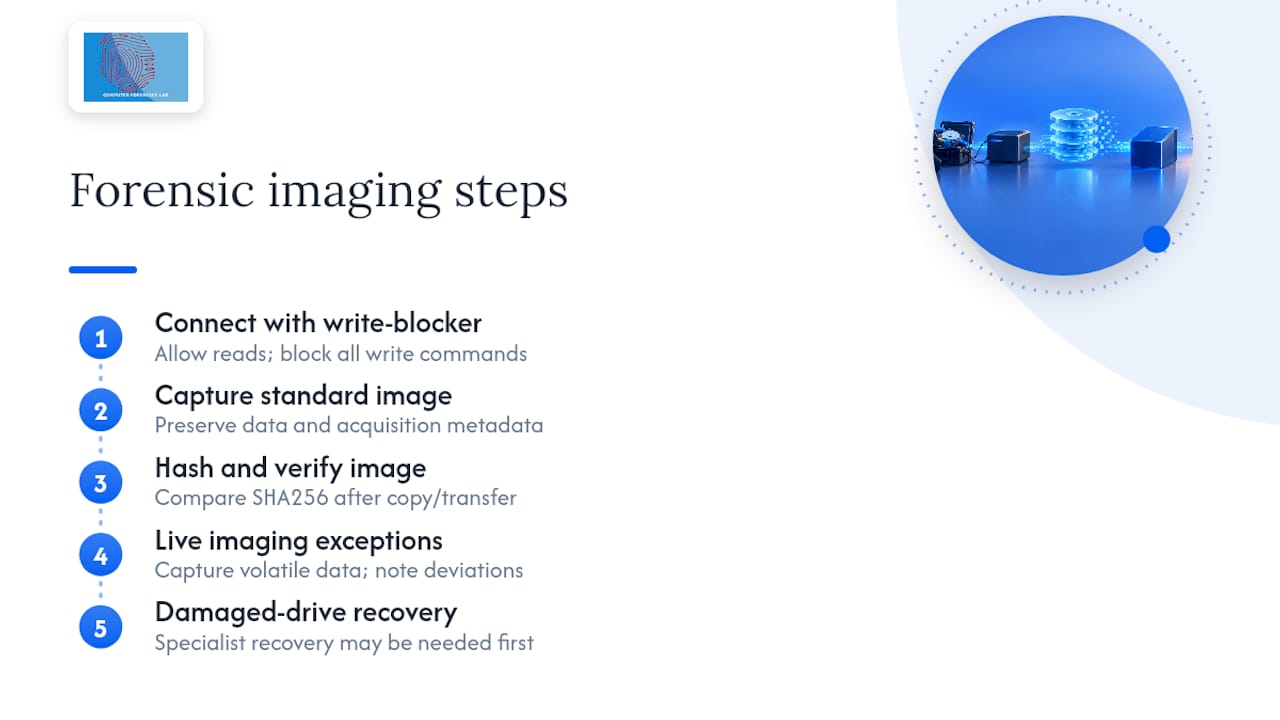
Forensic imaging creates an exact, verifiable copy of a storage device before any examination begins, and it’s the single most important technical step in the entire process. The examiner connects the source media through a hardware write-blocker, a device that physically permits read commands but rejects any write instruction, guaranteeing the original disk cannot be altered during the imaging process.
The image itself is typically captured in a standard container format that preserves not just the data but metadata about the acquisition itself, including timestamps and drive geometry. Once the image is complete, the examiner calculates a cryptographic hash value, usually SHA256, and compares it against a second hash calculated after the image is copied or transferred. If the two match, the copy is verified as identical to the source; if they don’t, something changed during transfer and the discrepancy must be investigated before analysis proceeds.
NIJ guidance recommends this approach specifically because it keeps the original evidence untouched while allowing unlimited examination of the copy. Live imaging, used when a device cannot be powered down without losing volatile data or triggering encryption locks, follows a modified version of the same principle: capture as much as possible, document every deviation from standard practice, and hash whatever is captured immediately. Damaged or physically compromised drives sometimes require specialist recovery techniques before imaging is even possible, which is one of the more significant cost and time variables in a case involving failed hardware.

Tools for memory and volatile data acquisition
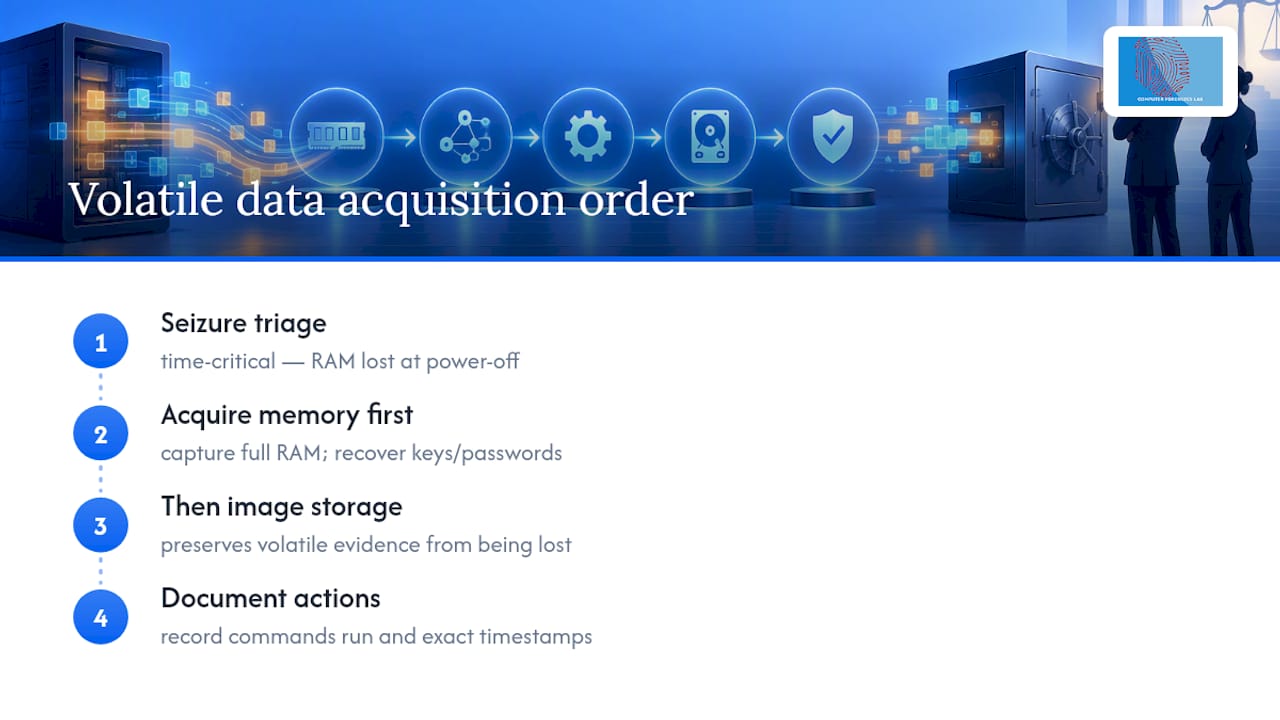
Volatile data, the contents of a computer’s random access memory, disappears the moment a device is switched off, which makes capturing it a time-critical decision at the scene of any seizure. Running processes, open network connections, encryption keys held in memory and recently typed passwords can all exist only in RAM, never touching the hard drive at all.
Memory acquisition tools capture the entire contents of RAM to a file before the device is powered down, and this has to happen before imaging the storage drive if both are needed. The order matters: acquiring memory first, then storage, preserves the most volatile evidence before it’s lost, while the reverse order risks that data disappearing entirely. Live acquisition of this kind carries an inherent trade off, since interacting with a running system to capture memory necessarily changes some system state, however minimal. Examiners document exactly what commands were run and when, so the change is accounted for rather than hidden.
Encrypted volumes present a related challenge. If a device is encountered unlocked, or if credentials are legitimately available, capturing memory can sometimes recover the encryption key needed to access the data later, which is often the only route into an otherwise inaccessible drive. This is one of the clearest examples of why triage decisions at the point of seizure carry consequences for the entire case: a decision made in the first few minutes at a property can determine whether encrypted evidence is ever recoverable at all.
Analysis tools for file system and artefact examination
Once an image is verified, examination tools parse the file system to reveal what’s actually on the disk, including material a user believed was deleted. File systems keep records of file locations, timestamps and, critically, pointers to data that has been marked for deletion but not yet overwritten. Recovering that material is often where the most probative evidence in a case is found.
Artefact examination goes beyond simple file recovery. Operating systems and applications leave behind a trail of secondary evidence: browser history and cached pages, recently accessed document lists, thumbnail caches that persist after the original image is deleted, registry entries recording when a USB device was connected, and application logs showing when software last ran. Timeline analysis correlates these artefacts across the whole system to reconstruct a sequence of user activity, which is frequently more persuasive to a court than any single recovered file on its own.
Different file systems (those used by Windows, macOS and Linux devices, along with the formats found on mobile devices) store this metadata differently, so the examination tool and technique has to match the source. This is one reason a competent lab validates its methods against multiple file system types rather than assuming a single approach covers every device it might be instructed on.
Mobile device forensic tools and considerations
Mobile phones and tablets present a distinct set of challenges compared with computers, largely because manufacturers actively design against unauthorised data extraction. Encryption is standard by default on most modern handsets, and many devices will wipe or lock permanently after a limited number of incorrect password attempts, which is why isolating a phone from network signal immediately after seizure matters so much.
Extraction from mobile devices generally falls into a few levels of depth. Logical extraction pulls accessible data such as contacts, messages and call logs through the device’s standard interfaces. Physical extraction, where supported, captures a more complete image of the device’s storage, potentially recovering deleted content that logical extraction would miss. The level of access achievable depends heavily on the specific device, its operating system version and whether it’s locked, and a competent lab will explain upfront which level is realistically achievable for a given handset rather than guaranteeing full extraction before the device has even been examined.
Messaging apps, cloud backups and account based data add further complexity, since evidence relevant to a case might sit partly on the device and partly in a cloud account tied to it. A thorough mobile examination considers both, and cloud data often requires separate legal authority to access, which is worth raising with the instructing lab early rather than assuming physical access to a device alone will answer every question.
Provider perspective: how Computer Forensics Lab approaches an instruction
Every instruction we accept is scoped against the Forensic Science Regulator Code and run through a documented QMS, with peer review before any report leaves the building. Our examiners have given evidence in contested proceedings and understand that a report is only as strong as the chain of custody behind it…
— Computer
Instructing Computer Forensics Lab: what to prepare and how it works
Computerforensicslab is the practitioner’s route to the outcome this article has just described: accredited acquisition, a defensible chain of custody, and a report built to survive cross-examination, without you having to assemble or manage that capability in-house. Where an internal IT team might attempt imaging with unvalidated tools and no documented QMS, an instruction here starts from a Code-compliant process by default.
Get in touch through the main services page with a short case summary, the devices or accounts involved, the legal authority for acquisition, and any court deadline. Corporate and legal teams needing broader e-discovery or expert witness support can review the full breakdown on the specialist services page. An initial intake call scopes the work and produces a quote, and urgent triage is available where devices are time-critical, such as a risk of remote wipe or an imminent hearing date. Contact the team to start that intake conversation today.
This article is general information, not a substitute for advice from a qualified lawyer. Consult a qualified legal professional about your own circumstances before acting on anything here.
Sources
- Disclosure manual: chapter 30 digital material – CPS
- Forensic examination of digital evidence: a guide for law enforcement | NIJ
- Best Practices for Computer Forensic Examinations – SWGDE
FAQ
What does “computer forensics toolkit” actually refer to?
It refers to the professional service, not a piece of software: the accredited process a lab uses to acquire, examine, analyse and report digital evidence so it holds up in court. Computerforensicslab provides this as an end-to-end service rather than a product you’d install yourself.
How long does a digital forensic investigation take?
Turnaround depends on the volume of data, whether encryption is involved, and how many devices need imaging. A single unencrypted device can be turned around quickly, while multi-device corporate cases with encrypted volumes take substantially longer, and urgent triage can be arranged where a deadline or wipe risk demands it.
Does a forensic report need ISO/IEC 17025 accreditation to be admissible?
The Forensic Science Regulator’s statutory code requires accreditation to BS EN ISO/IEC 17025 for many digital forensic activities in England and Wales, and a court is entitled to weigh a lack of accreditation when assessing the evidence’s reliability. Requirements can differ for civil or purely internal work, so it’s worth confirming the intended use of the report before instructing.
What information should I provide when instructing a lab?
Provide a case summary, the devices or accounts in scope, the legal authority for acquisition, and any court deadline. This lets the lab decide whether a targeted parameter search or a full examination is appropriate, rather than defaulting to the broadest and most expensive option.
How much does an investigation typically cost?
Cost depends on factors like the amount of specialist data recovery needed, the number of devices to image, and whether expert witness attendance at a hearing is required. Computerforensicslab does not publish fixed prices for these services, as scope varies by case, but current service details are available on request.