

eDiscovery software is a purpose-built platform that helps legal teams identify, preserve, review and produce electronically stored information (ESI) for litigation, regulatory investigations or internal enquiries. Its core job is to manage that data through the entire discovery lifecycle in a way that stands up to scrutiny in court. Done properly, it gives legal teams a defensible, auditable process that reduces both risk and cost.
- Proper eDiscovery requires careful preservation and collection of data from multiple sources, including email, messaging, and personal devices, to avoid sanctions and ensure defensibility.
- Advanced review tools like AI-assisted models and detailed metadata extraction significantly reduce review time and improve accuracy on large datasets.
- Forensic imaging and chain of custody documentation are essential when data tampering or deletion is suspected, especially for high-stakes or regulated matters.
- Selecting a platform that maps accurately to your data sources, supports compliance needs, and offers seamless integration is crucial to controlling costs and ensuring effective review workflows.
- External forensic expertise becomes necessary when dealing with complex collections, deleted data recovery, or cases requiring court-proof evidence handling.
Table of Contents
- What is eDiscovery and what does the workflow cover?
- How does eDiscovery software work in practice?
- What features actually matter in an eDiscovery platform?
- Why does eDiscovery software matter for legal teams?
- How do you keep collection defensible and maintain chain of custody?
- How do you choose the right eDiscovery software?
- What do real eDiscovery scenarios look like?
- What drives eDiscovery costs and how do they scale?
- When do you need a forensic lab instead of software alone?
- Where Computerforensicslab fits into your eDiscovery process
- Sources
What is eDiscovery and what does the workflow cover?
Electronic discovery is the process of identifying, collecting, preserving, reviewing and producing electronically stored information once litigation or an investigation is on the horizon. That ESI is rarely confined to a single inbox. It spans work email, Slack and Microsoft Teams messages, mobile app data, cloud documents in SharePoint or Google Workspace, and increasingly, data sitting on personal devices used for work.
The scope matters because a mistake at any stage of the process can lead to sanctions or spiralling costs, particularly when a party fails to preserve data it should reasonably have anticipated needing. The industry organises this lifecycle around a widely adopted model, the Electronic Discovery Reference Model (EDRM), which breaks the work into distinct stages:
- Identification — working out what data exists, where it lives, and who holds it.
- Preservation — issuing legal holds so relevant data cannot be altered or deleted.
- Collection — gathering ESI from custodians and systems in a forensically sound way.
- Processing — converting raw data into a reviewable, searchable format.
- Review — assessing documents for relevance, privilege and responsiveness.
- Analysis — surfacing patterns, key custodians and case themes.
- Production — delivering the final dataset to opposing counsel or regulators in an agreed format.
Each stage carries its own legal exposure. Skip preservation too late and you risk spoliation claims. Collect data carelessly and you may strip metadata a court needs to establish authenticity. Courts increasingly expect proportionality, meaning the scope of discovery should match the value and complexity of the matter rather than becoming a fishing expedition. Getting the early stages right is what makes everything downstream defensible.
How does eDiscovery software work in practice?
Once you understand the workflow, the software itself is best understood as the engine that automates and documents each stage. Most platforms follow a broadly consistent sequence, even though vendors package it differently.
- Ingestion — the platform connects to mailboxes, cloud storage, collaboration tools and endpoint devices to pull in raw data, often through pre-built connectors that support formats like PST files, cloud APIs and mobile backups.
- Processing — incoming files are indexed, run through OCR to make scanned documents and images searchable, and stripped of duplicates through de-duplication and near-duplicate detection.
- Metadata extraction — timestamps, authorship, file paths and communication threads are captured automatically, since this metadata often matters as much as the content itself when establishing authenticity.
- Review — reviewers search, filter and tag documents, apply privilege designations, and build issue codes that map to the case theory.
- Production — the final responsive set is exported with Bates stamping, load files, and the field-level metadata opposing counsel expects, packaged for secure transfer.
The review stage is where modern platforms differentiate themselves most. Technology-assisted review (TAR) and other AI-assisted tools let reviewers train a model on a sample set of documents, then apply that model to rank or filter the remainder by likely relevance. This does not replace human judgment on privilege calls, but it can dramatically cut the volume of documents a reviewer needs to read line by line. Some platforms include connectors and processing tools built specifically to handle modern collaboration data such as Slack threads and Teams chat exports, which behave very differently from a standard email archive once indexed.
Production is not just a file dump. A properly formatted load file tells the receiving system exactly how each document, its metadata and any attachments relate to one another, and Bates numbering ensures every page has a unique, traceable reference throughout the life of the case.
What features actually matter in an eDiscovery platform?
Feature lists across vendors look similar on paper. What separates a platform that helps from one that just adds noise is how well those features map to the realities of a live matter.
- Search and analytics — Boolean search still does the heavy lifting for narrow, known-term queries, while concept search and clustering help when you don’t yet know the exact vocabulary used in the data. TAR earns its keep on large document sets where manual review would take weeks.
- Legal holds and custodian tracking — the platform should let you issue, track and confirm acknowledgement of holds across every custodian, with reminders for anyone who hasn’t responded.
- Redaction and privilege workflows — redaction tools need to handle text, images and metadata consistently, and privilege logs should generate automatically as documents are tagged.
- Role-based access and audit logging — every action, from a search query to a tag change, should be logged against a named user, which matters enormously if collection methods are ever challenged.
- Collaboration features — multiple reviewers, outside counsel and compliance staff often need simultaneous access with different permission levels.
Pro Tip: Run a small pilot review on a sample of documents before committing to a TAR workflow for the full dataset. It exposes whether the model is learning the right distinctions before you’ve spent reviewer hours on the wrong training set.
Why does eDiscovery software matter for legal teams?
The honest answer is time, money and risk, roughly in that order of visibility but not necessarily importance. Culling irrelevant data early through de-duplication and date-range filtering can shrink a dataset by a significant proportion before a single reviewer opens a document, which directly reduces billable review hours.
Defensibility is the less visible but more consequential benefit. A platform that logs every action taken on a document gives you a clear audit trail if opposing counsel challenges how evidence was collected or handled. Courts that stress proportionality in discovery also expect parties to show they preserved data reasonably and produced it in good faith. Sloppy handling invites sanctions motions regardless of how strong the underlying case is.
There’s also a strategic upside that gets overlooked. Early case assessment, running search terms and analytics against the full dataset before formal review begins, lets legal teams gauge exposure and settlement value weeks earlier than a purely manual approach would allow.
How do you keep collection defensible and maintain chain of custody?
This is where software alone can fall short, and where forensic expertise earns its place in the process. Defensible collection means preserving data in a way that doesn’t alter its underlying metadata. Simply copying files from a laptop or server can change timestamps and file properties, which can undermine the authenticity of evidence later challenged in court.

A properly documented chain of custody records who collected each piece of data, when, using what method, and who has handled it since. That record needs to travel with the evidence through processing, review and production.
Key things to check when evaluating collection methods and hosting:
- Whether collection uses forensic imaging (a bit-for-bit copy) or targeted logical collection, and which is appropriate for the matter at hand.
- Whether the platform generates an audit log automatically or relies on manual record-keeping.
- Whether hosting infrastructure carries recognised security attestations such as ISO 27001, SOC 2, or, for government and regulated data, FedRAMP authorisation.
- Whether the vendor can produce documentation on request that shows exactly how a given custodian’s data was acquired.
FedRAMP authorisation specifically matters when a hosted eDiscovery provider handles government or heavily regulated data, since it signals the cloud environment has passed a formal federal security review rather than relying on a vendor’s own claims. When data may have been deleted, wiped or tampered with before collection began, that’s the point to bring in a forensic specialist rather than relying on the software’s native collection tools, since recovering deleted data defensibly requires techniques most eDiscovery platforms simply aren’t built for.
How do you choose the right eDiscovery software?
Vendor selection tends to go wrong when teams start with a feature checklist instead of their own data profile. Work backwards from what you actually need to handle.
- Map your data sources first. List every system your custodians actually use, including newer collaboration platforms, before comparing vendor connector lists against that map.
- Check integration with existing legal technology. Confirm the platform connects cleanly to your case management system, document management platform and any litigation support tools already in use, rather than becoming an isolated silo.
- Test the review interface with real users. A platform with strong back-end analytics is wasted if reviewers find the interface slow or confusing under deadline pressure.
- Confirm data residency and compliance requirements. Cross-border matters often require data to stay within specific jurisdictions, so ask exactly where servers are hosted.
- Compare pricing models against your matter profile. Per-gigabyte pricing suits smaller, one-off matters; per-user or subscription pricing often works out cheaper for firms running multiple simultaneous cases.
Buyers increasingly prioritise integration, security and predictable pricing over the length of a feature list, and that shift is a sensible one. A platform with fifty features you never use is worse value than one with twelve that map directly onto your caseload.
Pro Tip: Ask any vendor for a sample invoice from a matter of similar size to yours, not just a rate card. Per-gigabyte pricing can look attractive until hosting fees and per-user review seat charges are added on top.
Red flags worth watching for include vendors who won’t disclose hosting location, platforms that charge separately for basic audit logging, and sales teams who can’t explain how their TAR model handles privilege review.
What do real eDiscovery scenarios look like?
Software capabilities only make sense against actual scenarios legal teams face. A few recurring patterns illustrate how the pieces fit together:
- Civil litigation — an employment dispute typically requires collecting a departing employee’s email and shared drive documents, then reviewing for relevance and privilege before production to opposing counsel.
- Regulatory investigation — a compliance enquiry often demands rapid, cross-platform collection across email, messaging apps and financial systems, frequently under a tight regulator-imposed deadline.
- Internal HR enquiry — a disciplinary investigation usually calls for narrowly targeted collection from a single custodian’s device, with careful privilege review where legal counsel has been consulted.
- Cross-border matters — data residency rules can restrict where collected ESI is allowed to be hosted or processed, which needs resolving before collection begins, not after.
Each scenario demands a different balance of speed, scope and forensic rigour, which is exactly why a one-size-fits-all approach to collection rarely serves a legal team well.
What drives eDiscovery costs and how do they scale?
Three factors drive most eDiscovery budgets: ingest volume, hosted storage duration, and reviewer hours. Of these, reviewer hours are usually the largest line item, which is precisely why TAR and AI-assisted review carry real financial weight. A well-trained model can cut the number of documents needing manual eyes-on review substantially, though it adds upfront setup and validation time.
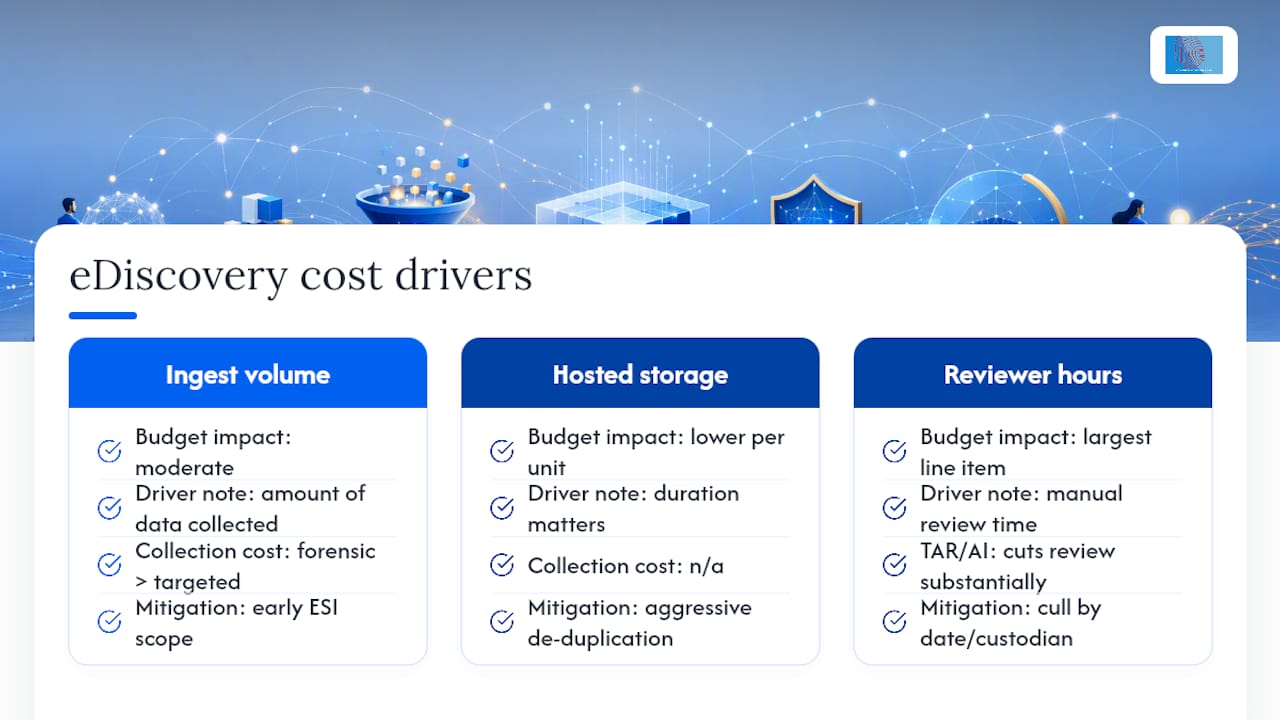

Forensic imaging costs more than targeted logical collection because it captures an entire drive rather than specific files, but it’s often the only defensible option when deleted data or tampering is suspected. For routine matters, targeted collection keeps both cost and turnaround time down.
Three practical levers keep spend under control: agreeing an ESI protocol with opposing counsel early to fix scope and format, aggressive de-duplication before review begins, and culling by date range or custodian relevance before anything reaches a human reviewer. Teams that skip early scoping conversations routinely pay for it later, in review hours nobody agreed to in advance.
When do you need a forensic lab instead of software alone?
Software handles the vast majority of routine discovery well. It falls short when data has been deleted, a device shows signs of tampering, or the matter needs an expert witness report that will face cross-examination. Those situations call for forensic imaging and a specialist who can testify to the collection method under oath.
For standard document review and production, in-house software is usually sufficient. Computerforensicslab exists for the cases in between: complex collections, suspected data destruction, or matters where the integrity of the evidence itself becomes the argument.
— Computer
Where Computer Forensics Lab fits into your eDiscovery process
Our electronic discovery specialists provide end-to-end support for the identification, preservation, collection, processing, searching, review and organisation of electronically stored information (ESI). We work with data held across a wide range of digital sources, including computers, laptops, hard drives, mobile devices, removable media, email systems, cloud platforms, cloud endpoints and other local, remote or hosted electronic storage environments. This can include data from services and endpoints such as Microsoft 365, Exchange Online, OneDrive, SharePoint, Teams, Google Workspace, cloud storage repositories, virtual machines, remote user accounts and other enterprise cloud environments. Our services are designed to assist solicitors, barristers, litigation teams, investigators, corporate legal departments and law enforcement agencies in locating relevant evidence, managing large volumes of electronic data and preparing defensible datasets for legal proceedings, investigations and regulatory matters.. More about our e-discovery services.
Sources
For deeper reading on the standards referenced throughout this article, consult the EDRM framework, The Sedona Conference glossary, and FedRAMP’s official guidance on cloud security authorisation. Computerforensicslab also publishes further guidance on chain of custody procedures and UK eDiscovery practice.
This article is general information, not a substitute for advice from a qualified lawyer. Consult a qualified legal professional about your own circumstances before acting on anything here.
- Electronic Discovery: What It Is and How It Works – LegalClarity
- E-Discovery basics: E-Discovery lifecycle – Gibson Dunn (EDRM framework summary)
- FedRAMP official site