Cellebrite UFED is the Universal Forensic Extraction Device platform used by forensic examiners to extract and preserve data from mobile devices. It is deployed principally by law enforcement, intelligence agencies and corporate investigators to recover evidence such as messages, call logs, application data and deleted files. The platform underpins many investigations because it is designed to capture data in a manner that supports evidential integrity and later court scrutiny.
TL;DR:
- Logical extraction is quick but less comprehensive, while full file system extraction takes longer and can recover encrypted app data and deleted files.
- UFED’s device support is extensive and validated through independent testing, making it a preferred choice in legal and law enforcement contexts.
- Extraction success depends on device encryption, lock state, and proper legal authorization, with certain models remaining inaccessible due to strong security measures.
- Handling devices improperly or attempting amateur extractions can compromise evidence integrity, emphasizing the importance of involving specialized forensic labs.
- The platform’s vulnerabilities have been disclosed publicly, but regular patches and proper documentation are essential for maintaining court admissibility.
Table of Contents
- What Cellebrite UFED is: definition and core capabilities
- How UFED works: extraction methods and trade-offs
- UFED formats and typical hardware and software setups
- Who uses UFED and common investigative use cases
- Limitations, security disclosures and practical constraints
- Practical note from a forensic lab: preserving evidence and when to seek help
- Overview of the timeline and process of data extraction using Cellebrite UFED
- Explanation of the process steps after extraction, such as data decoding and analysis
- Comparison with alternative mobile forensic tools and why Cellebrite UFED is preferred in certain scenarios
- Practitioner perspective on UFED’s role in modern digital forensics
- How Computer Forensics Lab supports mobile extraction and reporting
- Sources
- FAQ
What Cellebrite UFED is: definition and core capabilities
Cellebrite UFED is a mobile forensic extraction platform that has become an industry-standard tool for practitioners across policing, defence and corporate investigation. It was developed to give examiners a repeatable method for pulling data from a phone, tablet or similar device without altering the original evidence, which is the foundation of any forensically sound process.
The platform is built to recover a wide span of digital artefacts, and its value lies in how much it can surface beyond what is visible on a device’s screen.
- Call logs, contacts and SMS or MMS messages stored in device memory.
- Instant messaging and application data, including chat histories from messaging apps.
- Photos, videos and other media files, including those marked as deleted.
- System files and device identifiers, sometimes including cryptographic keys used to unlock protected data.
Because extracted material can end up in a courtroom, the process matters as much as the output. Examiners document each step, from initial seizure through to reporting, so that a defence team or opposing expert can trace exactly what was done and confirm nothing was altered. This is why UFED reports are typically paired with chain of custody records rather than treated as a standalone printout.
How UFED works: extraction methods and trade-offs
UFED offers several extraction types, and choosing the right one is a judgement call rather than a fixed procedure. Each method balances speed against how much data it can reach.
- Logical extraction pulls data that the device’s operating system readily exposes, such as contacts, messages and call logs, and is the fastest option.
- File system extraction copies the device’s file structure, revealing more application data and some deleted content that logical extraction misses.
- Physical extraction copies the device’s memory bit for bit, capturing deleted items and system artefacts that other methods cannot reach.
- Full file system (FFS) or selective extraction targets specific partitions or file types, which can unlock encrypted app data when the extraction captures the relevant keys.
Practitioner guidance from Cellebrite notes that logical extractions are fastest but least complete, while full file system extractions take longer but are often the only way to decode protected application data when encryption keys are present. The decision hinges on the device’s lock state, whether it uses full-disk encryption, how much time the investigation allows and what the case actually needs. A missing-person enquiry with a live suspect device calls for speed. A fraud case built for trial may justify a slower, deeper extraction to withstand challenge.
Pro Tip: Match the extraction method to the evidential question you are answering, not to what is fastest to run.
Examiners handling extraction decisions in the field often draw on established physical data extraction techniques to recover material that logical methods would otherwise leave behind.
UFED formats and typical hardware and software setups
Cellebrite packages UFED in several formats, and the choice depends on where and how the extraction happens. UFED 4PC is software installed on a standard PC, suited to lab-based work where a controlled environment reduces contamination risk. UFED Touch and ruggedised tablet units are designed for field deployment, allowing officers to triage a device at the scene before it ever reaches a lab.
- UFED 4PC: lab software for controlled, repeatable extractions on a workstation.
- UFED Touch or Tough tablets: portable units built for field triage and rapid first-response extraction.
- Ruggedised laptops and dedicated kits: field hardware for teams that need durability alongside processing power.
Form factor affects workflow. Field units prioritise speed and portability, while lab setups allow for slower, more thorough analysis. Licences require regular updates, since new devices and operating system versions appear constantly and older builds fall out of support.
Who uses UFED and common investigative use cases
UFED’s user base is concentrated among organisations with a lawful basis to examine seized or company-owned devices.
- Police and law enforcement agencies investigating serious crime, fraud and child protection cases.
- Intelligence and military units handling national security matters.
- Corporate incident response teams examining company-owned devices during internal investigations.
- eDiscovery teams collecting mobile evidence for civil litigation.
UFED sits within a broader forensic workflow: seizure, extraction, analysis and reporting. Extraction is only the middle step. What an examiner does with the recovered data, and how clearly that process is documented, determines whether the evidence holds up when challenged.
Limitations, security disclosures and practical constraints
UFED is powerful, but it is not without boundaries. Independent security researchers disclosed vulnerabilities in UFED and its companion software, Physical Analyzer, in 2021, including hard-coded keys and a route to arbitrary code execution. Cellebrite issued patches afterwards, and the episode was widely reported, including by Ars Technica, as part of a broader debate about forensic vendor transparency.
Security researcher disclosures do not necessarily invalidate a tool’s usefulness, but they highlight the need for patching, peer review and cautious reliance in court contexts.
Legally, UFED use is bound by licensing terms and lawful authority. An examiner needs proper legal grounds, whether a warrant, consent or an employment contract clause, before extracting data from a device, and the process must be documented at every stage. Technically, the platform cannot reach every device. Strong encryption, unsupported models and locked handsets can block extraction entirely, and attempts to force access risk damaging the device or corrupting the very data under examination.
Practical note from a forensic lab: preserving evidence and when to seek help
If you encounter a device that may hold relevant evidence, resist the urge to explore it yourself.
- Leave the device in its current power state rather than switching it on or off.
- Do not attempt a factory reset or password guesses, which can overwrite deleted data.
- Photograph the device and note where and how it was found before anyone touches it.
Improper handling can break the chain of custody and render otherwise recoverable data unusable in proceedings. When in doubt, instruct a specialist forensic lab and provide the device’s make, model, lock status and the case context so extraction can be planned correctly.
Pro Tip: Note the exact time you found the device. That timestamp often matters more than anything visible on the screen.
Overview of the timeline and process of data extraction using Cellebrite UFED
A typical UFED-based extraction follows a defined sequence rather than a single button press. It begins with device identification, where the examiner confirms the make, model, operating system version and lock status, since this determines which extraction methods UFED can attempt. The device is then connected through a cable or, in some cases, wirelessly, and the software selects a compatible extraction profile.

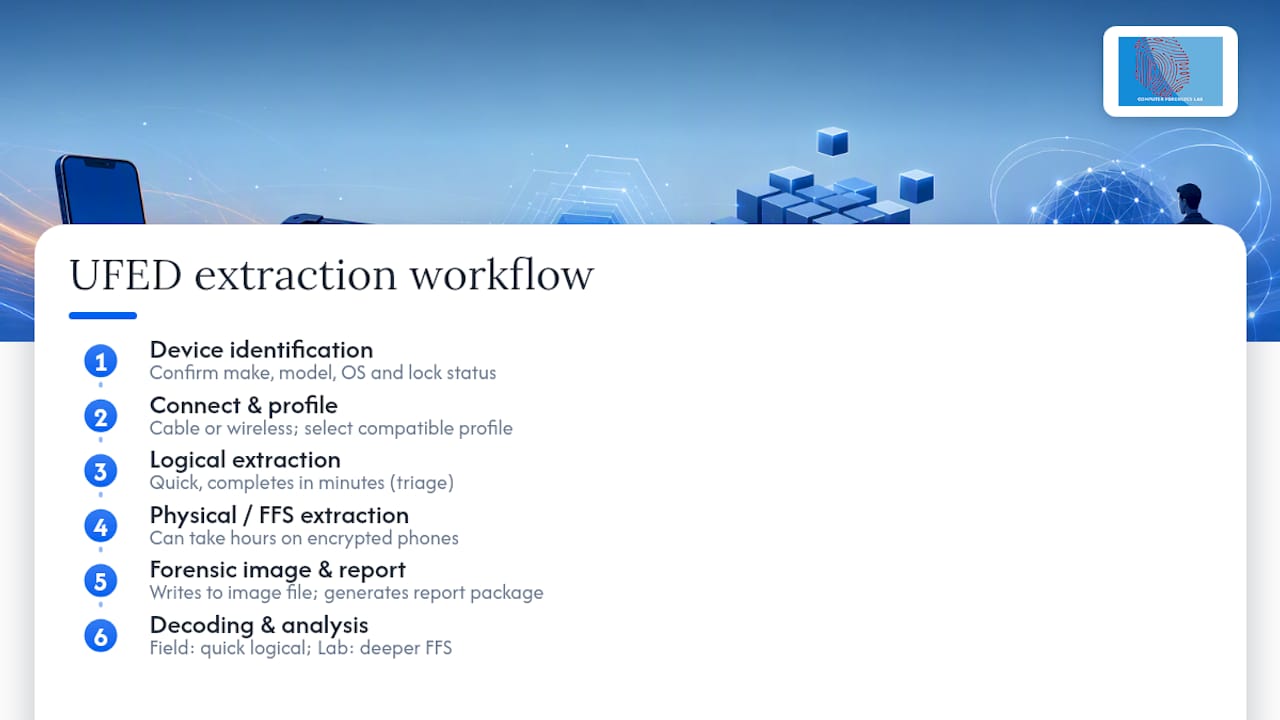
Next comes the extraction itself. A logical extraction can complete in minutes. A physical or full file system extraction, particularly on a modern encrypted smartphone, can take considerably longer, sometimes running for hours depending on storage size and device condition. Throughout this stage, the software writes to a forensic image file rather than the original device, preserving the source evidence untouched.
Once extraction finishes, the platform generates a report package and a data image ready for review. This is not the end point. The raw extraction is a snapshot of the device’s memory or file system, and it still needs decoding before an investigator can meaningfully search or interpret it. Field triage extractions are often kept deliberately quick, using rapid logical pulls to check for immediate leads, while the deeper physical or FFS work happens later in a lab setting where time pressure is lower and contamination risk is minimised.
Explanation of the process steps after extraction, such as data decoding and analysis
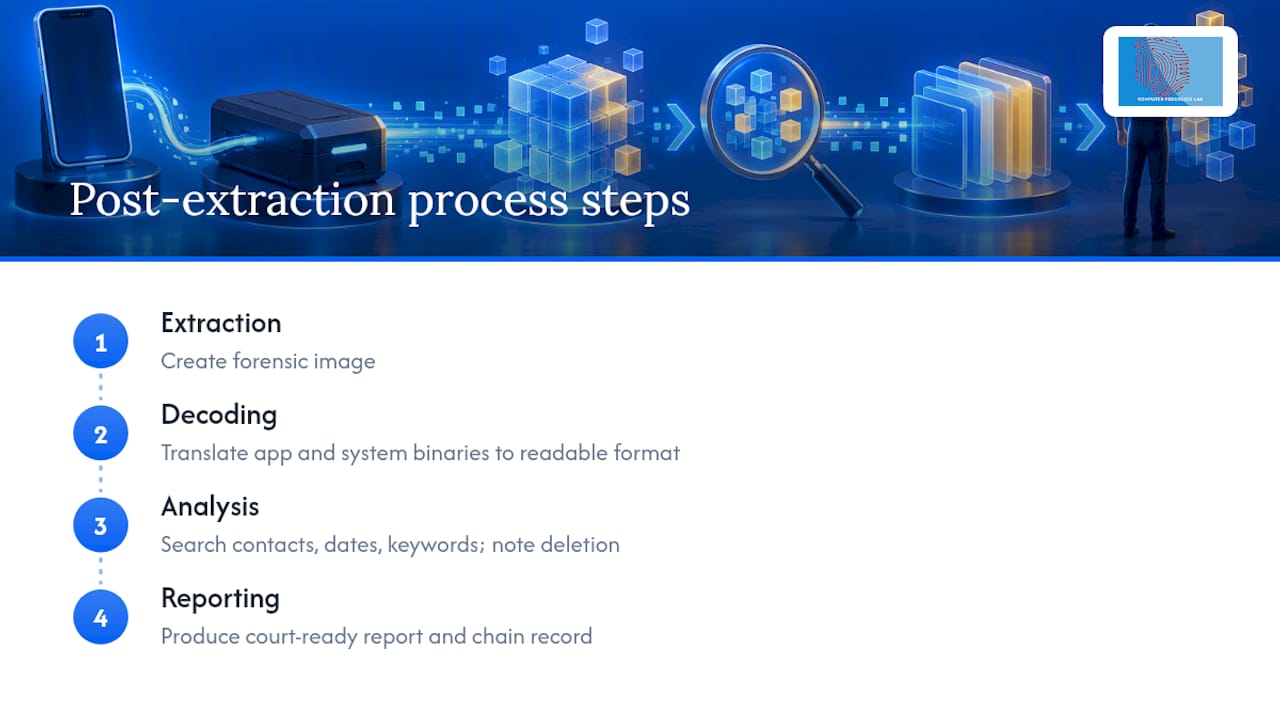
Extraction produces a forensic image, but that image is not yet readable evidence. Cellebrite’s software decodes the raw data, translating binary structures from apps, messaging platforms and system files into a format examiners can search, filter and export. Decoding quality varies by app and operating system version, which is why platforms require frequent updates to keep pace with how messaging apps and phone software change.
After decoding, the analysis stage begins. Examiners search the decoded dataset for material relevant to the investigation: specific contacts, date ranges, keywords or file types. Deleted items recovered through physical or full file system extraction sit alongside active data, and examiners note which category each item falls into, since that distinction can matter in court.
The final step is reporting. A forensic report sets out what was extracted, how, and what was found, in language clear enough for a court or opposing expert to follow without needing to operate the software themselves. This report, together with the chain of custody record, is what actually gets used in proceedings, not the raw extraction file. Analysts working on complex cases often draw on structured mobile device data extraction principles to keep the decoding and analysis stages consistent across similar devices, which matters when a case involves multiple handsets examined by different team members.
Comparison with alternative mobile forensic tools and why Cellebrite UFED is preferred in certain scenarios
UFED is one of several mobile forensic platforms in use, alongside other commercial extraction and analysis tools built for similar purposes. What tends to set UFED apart in practice is breadth of device support and the depth of independent testing behind it. NIST and DHS test results document UFED’s acquisition performance across many supported devices for specific tested versions, giving agencies a documented basis for relying on the tool rather than a vendor’s own claims alone.
An earlier NIJ evaluation similarly highlighted strong device coverage, reliable extraction workflows and useful decoding and reporting features, while also noting that regular updates are necessary to maintain coverage as new devices launch.
No single tool is universally superior for every device and case type. Some alternatives may handle a narrow category of devices well, or suit teams with different budget and licensing constraints. UFED’s advantage in many law enforcement and legal contexts comes from the combination of wide device support, formal independent testing and an established evidential track record, which matters when extraction results need to withstand scrutiny in a legal proceeding. Teams choosing between tools generally weigh device compatibility, the extraction depth required and how well a tool’s output has been independently validated, rather than picking on speed or cost alone.
Practitioner perspective on UFED’s role in modern digital forensics
UFED is a capable platform, but the tool alone does not produce court-worthy evidence. That comes from the examiner’s skill in choosing the right extraction method, correctly interpreting decoded data and documenting every step. Independent test reports and vendor patches matter, but they only maintain trust in the tool when practitioners keep pace with training and validate outputs on each case rather than assuming consistent performance across every device.
— Computer
How Computer Forensics Lab supports mobile extraction and reporting
Extracting data from a phone is only useful if the process holds up under legal scrutiny, and that is where instructed specialists add value beyond running the software. Specialist forensic labs handle mobile device extraction, decoding and analysis, and produce the expert witness reports and chain of custody documentation that legal teams rely on.
- Mobile device extraction and analysis using established forensic methods.
- Expert witness reports written for court and legal proceedings.
- Chain of custody management from initial instruction through to final reporting.
Instructions typically begin with a call to establish the case background and device details, followed by secure evidence handling and a transparent report at completion. Visit Computer Forensics Lab to discuss an instruction or request further detail on the mobile forensics service.
Sources
- Cellebrite UFED version 1.176 evaluation report (NIJ/OJP)
- Test results for mobile device acquisition tool: Cellebrite UFED4PC v7.69.0.1397 – Physical Analyzer v7.68.0.25 (DHS/NIST CFTT)
- Moxie Marlinspike — Cellebrite vulnerabilities (Signal blog)
- Ars Technica coverage of UFED vulnerabilities
FAQ
Can members of the public use Cellebrite?
Cellebrite’s UFED platform is licensed to law enforcement, government, military and approved corporate or legal customers, not sold directly to the general public. Anyone needing a mobile device examined should instruct a specialist forensic lab rather than attempt to source the software independently.
Can Cellebrite be used to unlock a phone?
UFED can extract data from many devices, and in some cases the extraction process recovers keys that decode protected app data, but it cannot bypass every lock or encryption scheme. Strong encryption and unsupported models can prevent extraction entirely, and forcing access risks damaging the device.
How does Cellebrite UFED work?
UFED connects to a device and performs one of several extraction types, ranging from fast logical extraction to slower physical or full file system extraction that captures deleted and protected data. The choice depends on the device’s lock state, encryption and what the investigation actually requires.
What are the limitations of Cellebrite UFED?
UFED cannot extract from every device, particularly those with strong encryption or unsupported operating systems, and researchers have previously disclosed vulnerabilities in its software that required vendor patches. Its use is also bound by licensing and lawful authority, meaning examiners need proper legal grounds before extracting data from any device.
Is Cellebrite UFED considered reliable for court evidence?
Independent testing bodies, including NIST and DHS, have published test results documenting UFED’s acquisition performance across many supported devices for particular software versions, which gives practitioners a documented basis for court reliance. Reliability also depends on the examiner following proper procedure and maintaining a clear chain of custody throughout the extraction and reporting process.