
Penetration testing automation tools run the repeatable parts of a security test (discovery, scanning, authenticated crawling, exploitation of known weaknesses and reporting) at a speed and frequency that people cannot match. They do not replace a qualified tester’s judgement, and the results are only as dependable as the scope, authorisation and validation around them. For a firm, a local authority or a company director in England, the sensible position is to use automation for coverage and to commission a forensically disciplined, human-led test where the findings may later be relied on in a dispute, a regulatory inquiry or court. Our Digital Forensics Investigations and cyber security audit services are built for that second situation.
Key Takeaways
- Automated tools cover reconnaissance, scanning, authenticated web testing, exploitation of known issues and report generation; they are strongest at breadth and repetition.
- A scan that never logs in may test only about a tenth of an application’s real attack surface, so authenticated configuration decides whether a result means anything.
- Running any tool against a system you have no permission to test can be an offence under the Computer Misuse Act 1990, so written authorisation and a defined scope come first.
- Intrusive automated checks can cause data loss or outages on live systems, so timing, back-ups and rules of engagement matter as much as the tool.
- Where findings may be disclosed, challenged or produced as evidence, a documented, independently reviewed test with chain of custody is the safer route.
Table of Contents
- What penetration testing automation tools actually do
- Automated testing, vulnerability scanning and manual testing compared
- How automated web application testing works
- What automation does well
- What automation does not do, and the risks of running it badly
- Permissions and safeguards before anything is run
- How to choose and configure automated tools
- When the result may be needed as evidence
- Where we fit
- Our perspective
- FAQ
- Sources
What penetration testing automation tools actually do
A penetration test is an authorised attempt to find and exploit weaknesses in a system, in the way a real attacker would, so that the owner can fix them first. Automation tools take over the mechanical stages of that work. Professional training bodies note that modern penetration testing tools now include built-in automation capabilities, and the same families appear again and again: network and port scanners, web application scanners, exploitation frameworks, credential-testing utilities and orchestration scripts that chain several of these together.
In practical terms, automation usually covers the following stages:
- Reconnaissance and enumeration: identifying hosts, open services, subdomains, technologies and endpoints.
- Vulnerability identification: matching what was found against databases of known weaknesses and common misconfigurations.
- Active testing: sending crafted requests to see whether a suspected flaw can really be triggered.
- Exploitation of known issues: using proven techniques to confirm that a weakness gives access.
- Reporting: mapping findings to recognised scoring and category schemes so that they can be triaged.
What it generally cannot do is understand the business. A tool does not know that a particular spreadsheet export holds client money, that a manager’s login is shared with a contractor, or that a harmless-looking workflow lets one customer view another’s file. Those are the findings that tend to matter most to a solicitor, a compliance officer or a board.
Our longer guide to automated penetration testing tools sets out the categories in more detail; this article concentrates on how to judge them and use them safely.
Automated testing, vulnerability scanning and manual testing compared
The terms are used loosely by vendors, and the difference matters when you are deciding what to buy or commission. An academic overview of testing methodologies draws the line this way: vulnerability assessment is typically automated tooling with manual verification, run at least quarterly and fairly quickly, while penetration testing is a manual process that may use automated tools, run at least annually and lasting days or weeks. The assessment reports potential risks; a penetration test describes vulnerabilities that were verified and how they could be exploited.
| Vulnerability scan | Automated pen test | Human-led pen test | |
|---|---|---|---|
| Main purpose | List potential weaknesses | Confirm which weaknesses can be exploited | Show how an attacker would reach what matters |
| Frequency | Often continuous or weekly | Per release or monthly | Typically annual or after major change |
| Strength | Breadth and speed | Repeatable validation | Business logic, chaining, judgement |
| Weakness | Many unconfirmed results | Limited by configuration and coverage | Slower, a point-in-time view |
| Suited to | Routine hygiene | Regression checking between tests | Assurance, disclosure, regulatory and legal reliance |
The National Cyber Security Centre describes a well-scoped test as one that can give confidence that tested products and controls follow good practice and carry no common or publicly known vulnerabilities, at the time of the test. That last phrase is the point: any test, automated or not, is a snapshot, and automation is valuable partly because it lets you refresh the snapshot more often.
How automated web application testing works
Most automated testing that organisations buy is aimed at web applications and APIs, so it is worth understanding the mechanism. The method is known as dynamic application security testing (DAST): the tool tests a running application from the outside, with no access to the source code. OWASP, the not-for-profit body behind the best-known web security standards, notes in its DevSecOps guideline that DAST is language-agnostic and finds runtime issues such as configuration, authentication and session flaws, with few false positives for findings that are confirmed.
A typical commercial-grade scanner works in phases. PortSwigger’s documentation for its scanner describes passive auditing of normal traffic, active auditing with modified requests, and JavaScript analysis using both static and dynamic techniques. The same page explains that dynamic execution in a headless browser, which is a browser running without a visible window, confirms whether a flaw is exploitable and is much less prone to false positives, which is why findings from static analysis alone are given lower confidence.
The practical consequences for a non-specialist reader are these:
- The tool needs credentials to see behind the login page. OWASP warns that a scan that never authenticates may test only about 10% of the real attack surface. A clean report from an unauthenticated scan of a client portal is therefore weak reassurance.
- Different user roles need testing. A tool that logs in as an administrator only will not reveal whether an ordinary user can reach restricted records.
- Stateful processes need explicit set-up. Multi-step actions such as submitting a claim, approving a payment or uploading a document do not test themselves.
- Results do not point to the faulty line of code. Because the tool sees behaviour rather than source, developers still need to trace each finding back to its cause.
What automation does well
Used properly, automation brings real advantages, and an organisation that ignores it will test less often than it should.
- Coverage across a large estate. A tool can check hundreds of hosts or endpoints in the time a person would spend on a handful.
- Consistency. The same checks run in the same way every time, which makes before-and-after comparison after a fix straightforward.
- Frequency. Testing on each software release catches regressions that an annual test would find eleven months late.
- Prioritisation. Better scanners rank what to examine first. PortSwigger states that its scanner scores audit items 80% on attack-surface exposure and 20% on interest level, and recalculates the queue as new items are found.
- A clear record. Automated runs produce logs and timestamped output that can support a remediation plan.
What automation does not do, and the risks of running it badly
The commercial reviews that rank for this subject tend to compare products on price and feature lists. The more important questions for a firm of solicitors or a company director are about control and consequence.
Live systems can be harmed. The most intrusive checks in a scanner can, in the words of the vendor’s own documentation, cause permanent data loss or outages on live systems. Agree a testing window, confirm that recent back-ups exist and decide in advance which systems are excluded. Case-management platforms, document stores and anything holding client money deserve particular care.
Findings need validation. A raw tool output is a list of leads. Someone competent has to decide which are genuine, which are duplicates and which are noise, and then explain the impact in terms the business understands.
Tools can be misconfigured. Wrong scope, missing credentials or an overly cautious profile all produce a reassuring but misleading report.
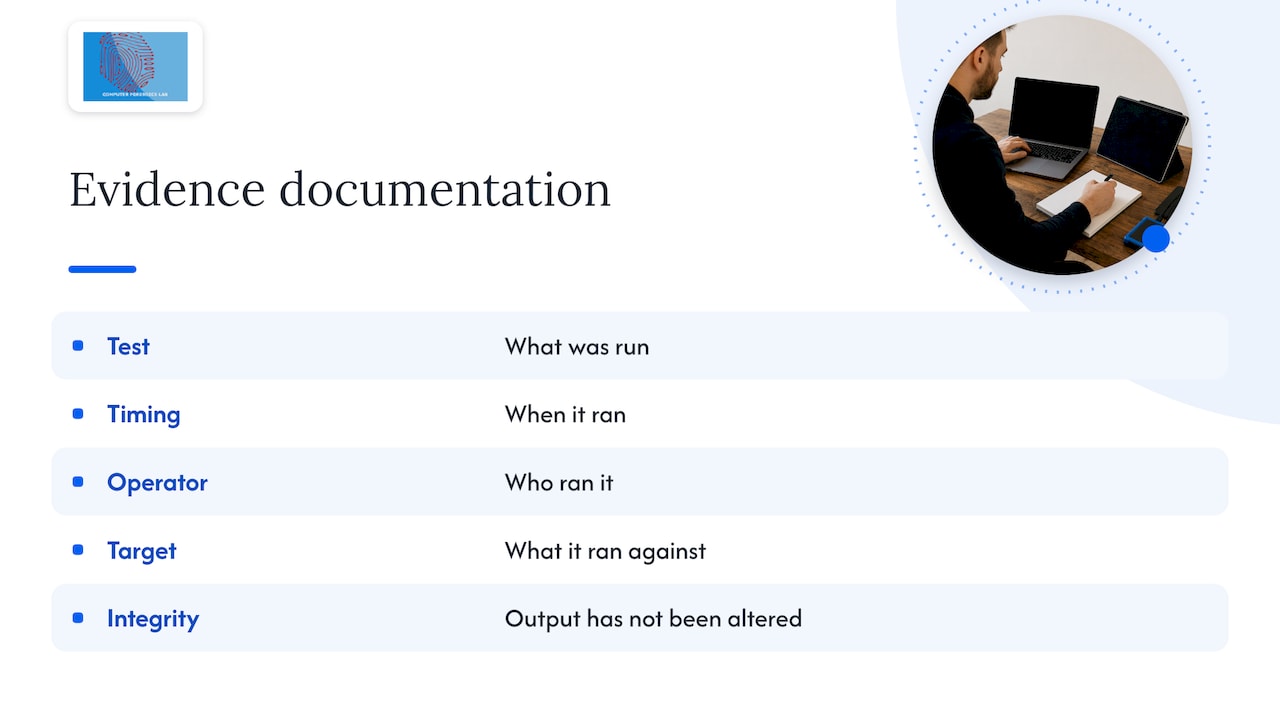
Automated output is not, by itself, evidence. If a result may later be disclosed in litigation or relied on in a regulatory response, you need to be able to show what was run, when, by whom, against what, and that the output has not been altered. That is a question of documentation and chain of custody, not of tooling.
Permissions and safeguards before anything is run
The law in England and Wales is direct. Section 1 of the Computer Misuse Act 1990 makes it an offence to cause a computer to perform a function with intent to secure unauthorised access to any program or data. A tool pointed at a system you do not own, or that you are not authorised to test, can therefore expose the person running it to criminal liability, whatever their motive.
Before any automated test, put the following in place:
- Written authorisation from someone with authority over every system in scope. Where systems are hosted by a third party, such as a cloud or software provider, check that provider’s testing rules and obtain consent where required.
- A defined scope listing addresses, applications, environments and, equally, what is excluded.
- Rules of engagement: permitted techniques, testing hours, whether intrusive or denial-of-service style checks are allowed, and who to call if something breaks.
- Named contacts on both sides and a stop procedure.
- Data-handling terms. Testing may expose personal data. Decide who may see it, where output is stored and how long it is kept, with your data protection lead involved.
- Back-ups and a rollback plan for anything that could be changed.
The NCSC recommends that scoping involves the risk owners, technical staff who know the target system and a representative of the test team. That is a sound model even for an automated run: the person who configures the tool should never be the only person who understands the target.
How to choose and configure automated tools
For most organisations the question is not which product tops a ranking but which fits the thing being protected. A workable selection routine is as follows.
- Define what you are testing. A public website, an authenticated client portal, an API, an internal network and a cloud environment each need different tooling.
- Match the method to the target. Web and API testing relies on DAST-style tools. Network testing relies on scanners and exploitation frameworks. Cloud testing depends on configuration review as much as active probing.
- Check authentication support. The tool should handle your login method, and you should supply credentials for more than one role where you can.
- Check how findings are verified. Prefer tools that confirm exploitability rather than only listing suspicions.
- Check the reporting. Output should be exportable, timestamped and mapped to recognised categories so that it can be tracked through remediation.
- Decide who reads the results. A tool without a competent reviewer simply creates a backlog.
- Plan the human layer. Use automation between periodic human-led tests, not instead of them.
Open-source options exist and are widely used by testers; OWASP’s testing guide lists common tools for web application testing while stating that it is not a complete reference and implies no endorsement. Whatever the licence, the cost that matters is the skilled time needed to configure, run, interpret and act on the output.
When the result may be needed as evidence
Solicitors, criminal lawyers and company directors face a different test from a security team. A routine vulnerability report seldom has to survive cross-examination. A report on how an intruder entered a system, whether a former employee copied data, or whether a system was secure at a relevant date might.
In those circumstances the following become as important as the findings themselves:
- a clear record of instructions, scope and authority;
- documented methods that another competent examiner could repeat;
- preservation of logs and output so that they cannot later be said to have been altered;
- an author who can explain the work and, where required, give expert evidence;
- independence from the system’s owner and from whoever built it.
This is the territory of digital forensics rather than routine security tooling, and it is where an automated report on its own rarely suffices.
Where we fit
Computer Forensics Lab is a digital forensics service provider based in London, working for legal professionals, law enforcement, businesses and private clients. Our services include data breach investigations and cyber security audits, malware and hacking discovery, computer network forensics and cybercrime analysis, together with expert witness provision and presentation. We are independent and impartial, and our approach is built around chain of custody, ISO 17025 quality standards and transparent reporting supported by peer review.
If you are weighing automated testing against a commissioned engagement, or need to know what an automated result can safely be relied on for, speak to us before you run anything that touches a system under dispute.

We can be instructed on a project or hourly basis, and you can contact the team through our site to discuss a matter. For related reading on what happens once malicious code is found, see our guidance on malware detection strategies for UK legal and corporate teams.
Our perspective
Automation has made security testing cheaper to repeat, and that is a genuine improvement. We expect clients to use it, and to use it often.
Our concern is with what is asked of its output. A scanner report is a statement about a system on a given day. When that statement has to support a disciplinary decision, an insurance claim, a regulatory response or a witness statement, the questions change. Who authorised the test? What exactly was run? Can the result be reproduced? Has anything been altered since? Who will stand behind the conclusions?
That is why we approach a technical question as an evidential one from the outset. Our work is built on independence, documented method, chain of custody and reports that a court or regulator can follow. For legal professionals in particular, we think the right pattern is automation for breadth and routine assurance, and a forensically disciplined examination whenever the outcome may be contested.
Computer
FAQ
Is penetration testing automation enough on its own?
Automation is excellent for breadth and repeat checks, but it does not reason about business logic or chain minor flaws into a serious one. The usual pattern is regular automated testing between periodic human-led tests. Where findings may be relied on in a dispute, a documented human-led engagement is the better foundation.
Is pentesting illegal?
Not when it is authorised. Under section 1 of the Computer Misuse Act 1990, securing unauthorised access to a computer or its data is an offence, so testing needs written permission from the system’s owner and a defined scope. If third-party hosting is involved, check that provider’s rules too.
What is the difference between a vulnerability scan and an automated penetration test?
A scan lists potential weaknesses by matching systems against known issues. An automated penetration test goes further and attempts to confirm that a weakness can be exploited. Academic overviews describe the first as reporting potential risks and the second as describing verified vulnerabilities and how they may be exploited.
Can automated tools damage my systems?
Yes, if they are run carelessly. Intrusive checks can, according to PortSwigger’s scanner documentation, cause permanent data loss or outages on live systems. Agree a testing window, confirm back-ups and exclude critical systems unless they are specifically in scope.
How often should automated testing be run?
Many organisations run it on each significant release or on a regular schedule, and repeat a deeper human-led test annually or after major change. The right rhythm depends on how fast your systems change and what they hold. The NCSC’s penetration testing guidance is the best starting point for planning.
Sources
- CompTIA: Penetration Testing Automation: An Essential Skill
- Overview of Penetration Testing Methodologies and Tools (Bilkent University)
- NCSC: Penetration testing
- OWASP DevSecOps Guideline: Dynamic Application Security Testing
- PortSwigger: Auditing
- OWASP Web Security Testing Guide: Testing Tools Resource
- Computer Misuse Act 1990, section 1 (legislation.gov.uk)